Free Flashcard Maker printable double-sided cards that line up
Type or paste your terms, pick 4 to 12 cards per page, then print front and back pages that match. Free, no signup, no watermark, and your words never leave your browser.
Single-sided, double-sided or fold-over cards on US Letter or A4. Long-edge and short-edge duplex, a back page nudge for stubborn printers, PDF, PNG and direct print.
Read the printing guideFlashcard maker for printable double-sided study cards
Type front and back text or paste a list, choose a layout, print a test page, then print or save a PDF or PNG.
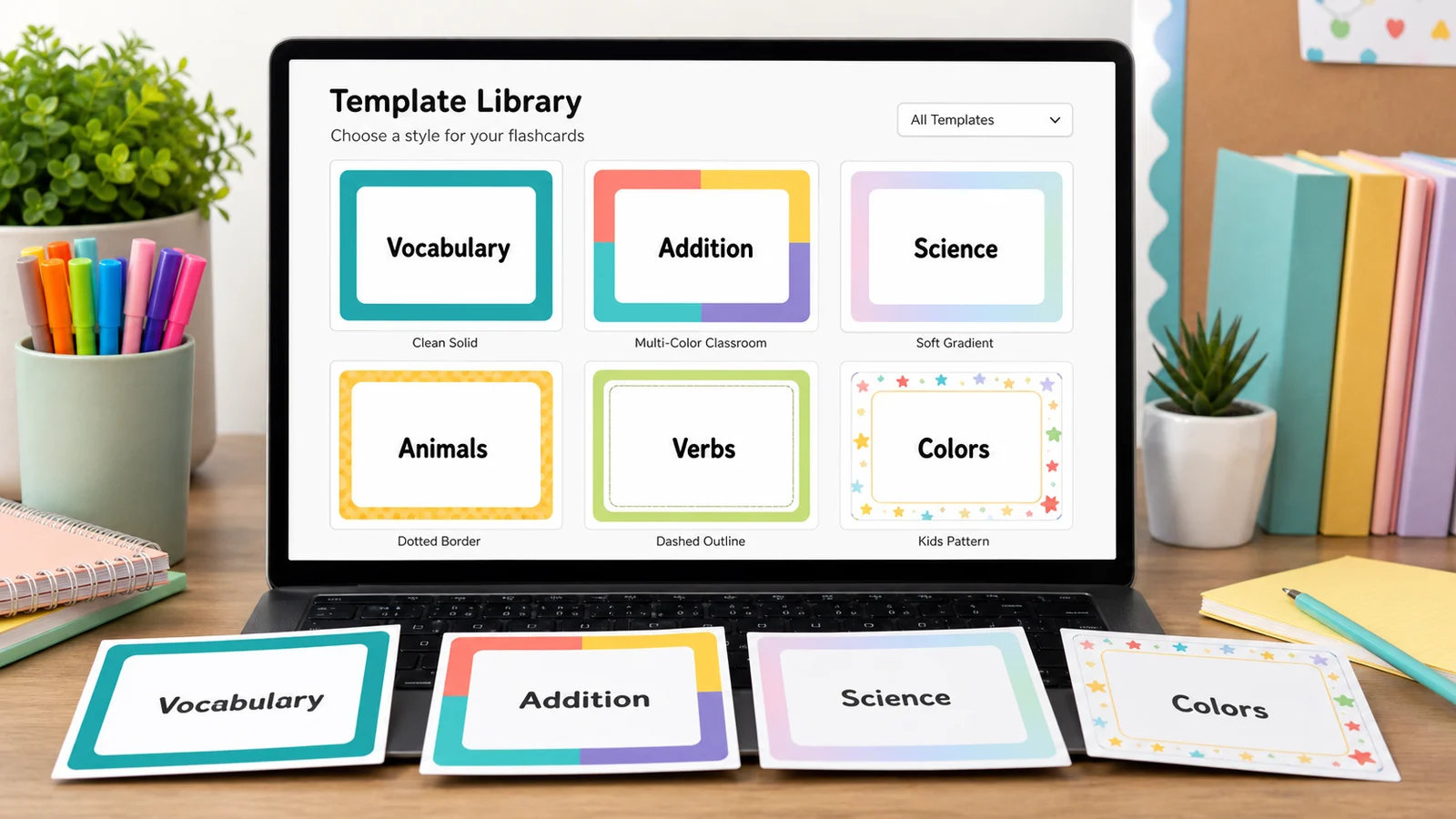
Template librarySelected template: Language practiceTemplates are collapsed by default. Open the library when you want sample cards, print modes, or style presets.
Front / Back cards
Put the prompt, term, date, question, or math fact on the left. Put the answer, definition, event, explanation, or result on the right.
Batch paste input
Paste one card per line. The Flashcard Maker detects tabs, pipes, semicolons, commas, colons, and spaced dashes. Left text becomes the front; right text becomes the back.
Print settings
Choose the same edge in your printer's duplex setting. If the back comes out upside down, switch to the other edge.
Fine-tune after a test print, from -5 to 5 mm. Negative values move the back left or up. The setting stays when you change template.
Printable flashcard deck
Language Learning Flashcards
Double-sided printing tips
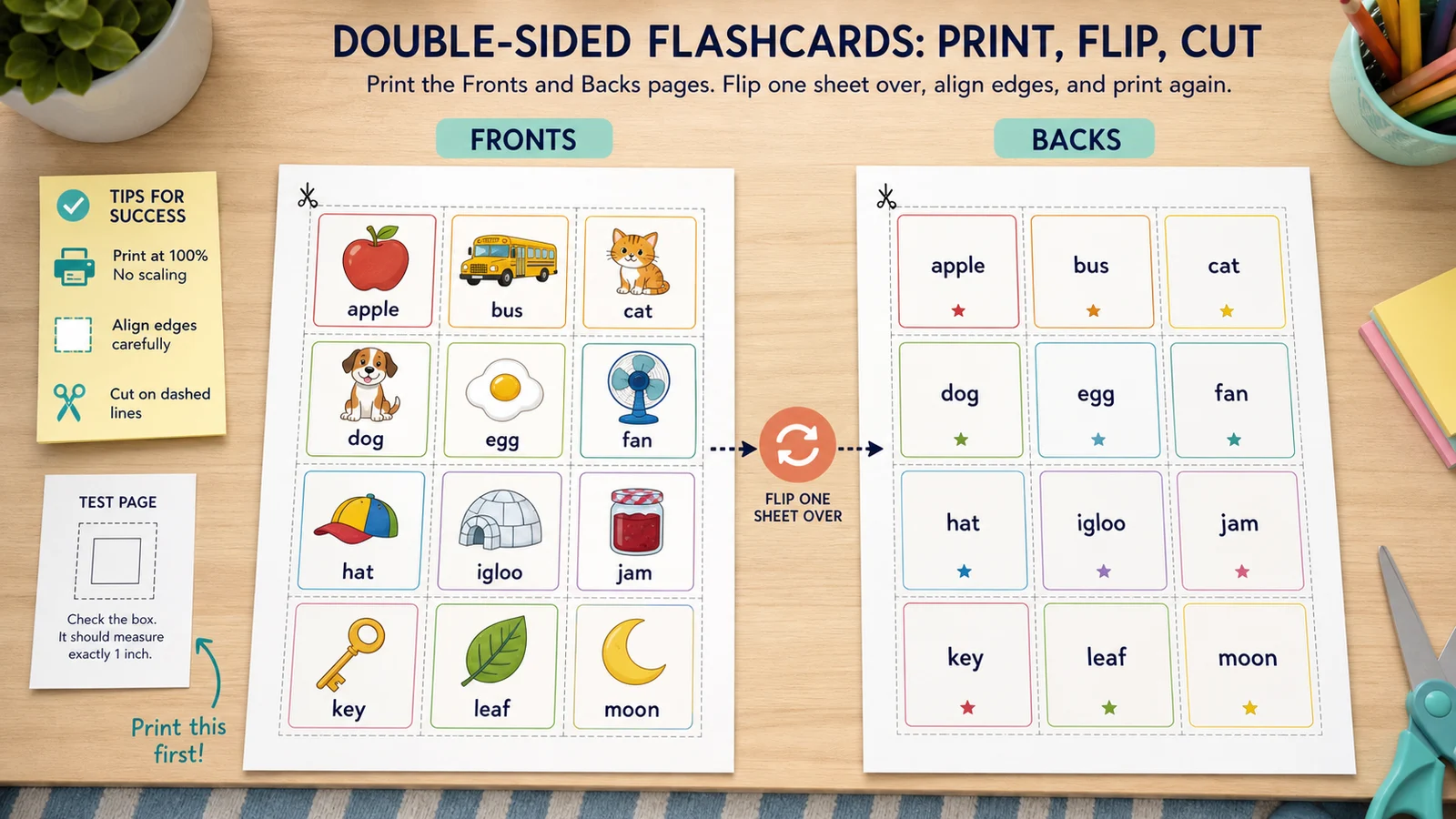
- Print the test page first. In double-sided mode it prints one front and one back; hold them up to a window to check the alignment.
- Use the same flip edge here and in the printer dialog. If the back is a little off, enter a back page shift.
- Print at 100% or actual size and turn off fit to page, or the cut lines will drift.
- For fold-over mode, cut the cards, fold along the center line and glue or tape the halves.
Front page preview - Page 1
Back page preview - Page 1
Flashcard maker: quick facts
Short answers for students, teachers and parents choosing a free way to print flashcards at home.
- Price
- Free, with no paid tier or download fee
- Account
- Not required
- Watermark
- None
- Export formats
- PDF, PNG and direct print
- Paper sizes
- US Letter (8.5 × 11 in) and A4 (210 × 297 mm), portrait
- Supported sizes
- 4, 6, 8, 10 or 12 cards per page. On A4 that is 91 × 128 mm for 4 cards down to 59 × 62 mm for 12; the tool shows the exact size for your settings
- Privacy
- Runs in your browser; nothing you type is uploaded
- Languages
- 8 languages: English, Chinese, Spanish, Portuguese, French, German, Japanese, Korean
- Print modes
- Single-sided, double-sided (back page mirrored to match) and fold-over cards
- Duplex setting
- Long-edge or short-edge flip, plus a back page shift of up to 5 mm in each direction
- Adding cards
- Type front and back text, or paste one card per line separated by a tab, pipe, comma, semicolon, colon or dash
- Looks
- 10 color themes, 8 decorations, 5 font sizes, optional cut lines
- Starter decks
- 12 templates: vocabulary, languages, history, science, math facts, exam review, phonics, geography, chemistry, art, music and coding, plus alphabet card decks with a picture for every letter
- Last updated
- October 18, 2026
Best for
- Students who want to turn a vocabulary or exam list into a printed deck in a few minutes
- Teachers who need a class set of double-sided cards without a Word table
- Parents who want a simple printable deck for math facts, sight words or a language
Not the best fit for
- Spaced-repetition scheduling or progress tracking: nothing is saved, so use Anki for that and print the cards you want on paper
- Importing a PDF or generating cards with AI: you type or paste the text yourself
- Pre-cut stock with fixed perforations, such as Avery sheets: the layouts here are made for plain paper or cardstock that you cut
How it compares
- Quizlet
- Great for studying on screen and sharing sets, but printing is a side feature and you need an account to save sets. Here you only print, with no account.
- Anki
- Best for spaced repetition on screen, and it has no built-in print layout (printing needs an add-on). This tool is the print companion: paste your list and get matching sheets.
- Word, Google Docs and Avery templates
- Free and flexible, but the back page needs a hand-built mirrored table, and Avery templates fit only Avery stock. Here the back page is mirrored for you and there is a test page.
A flashcard maker built for front and back pages that match
Preview every page, choose how it prints, and fix small alignment problems before you waste a stack of paper.
Flashcard maker with front and back page previews
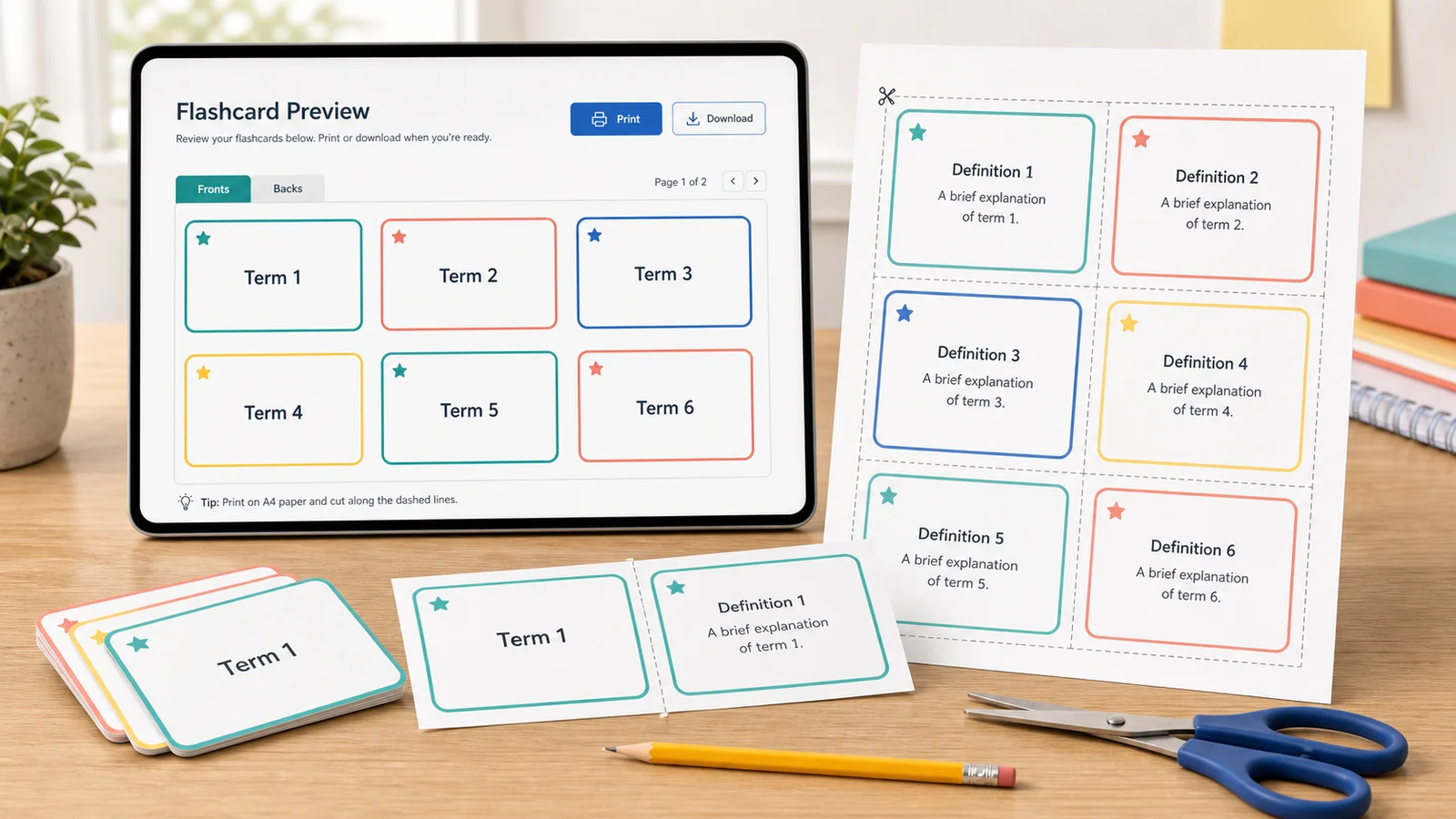
See each front page and each back page before you print, with the cut lines, card count, paper size and exact card size in millimetres and inches. Pasting a list fills the whole deck in one step.
Print double-sided flashcards that line up
Pick long-edge or short-edge flip to match your printer, print a test page with one front and one back, and shift the back page by up to 5 mm if your printer drifts. Fold-over cards need no alignment at all.
Flashcard maker templates for any subject
Start from 12 sample decks, from vocabulary and languages to math facts, phonics and coding, then swap in your own cards. Ten color themes and eight decorations keep a class set easy to sort.
What this flashcard maker can and cannot do
It makes printed front and back cards well. It is not a study app, and it says so.
Front and back input
Type each card in two columns: the prompt, term or question on the left, the answer on the right.
Paste a whole list
One card per line, split at a tab, pipe, comma, semicolon, colon or spaced dash. Replace the deck or add to it.
Duplex-aware layout
Long-edge or short-edge flip, a mirrored back page and a back page shift for printers that drift.
PDF, PNG and print
Exports match the preview, with the same borders, cut lines and colors. No watermark.
Private by design
Your cards stay in your browser. There is no account, upload or cloud deck.
Not a study app
No spaced repetition, quizzes, progress tracking, AI card generation or PDF import. Print the deck and study on paper.
How to make flashcards with this flashcard maker
Four steps from a list of terms to a stack of cut, double-sided cards.
Pick a starting deck
Open the template library for one of 12 sample decks, or keep the default and replace the cards. Your paper size, flip edge and back page shift stay when you switch templates.
- Templates are only a starting point: every card can be edited.
- Reset goes back to the deck you started with.
Add the front and back text
Type cards in the table, or paste one card per line into batch input and choose Replace or Append. Left of the delimiter becomes the front, right becomes the back.
- Keep the back short enough to read at a glance.
- Use fewer cards per page for long definitions.
Choose paper and print mode
Select US Letter or A4, 4 to 12 cards per page, then single-sided, double-sided or fold-over. For double-sided, pick the same flip edge you will choose in the printer dialog.
- Long edge flip suits most printers for portrait pages.
- Print at 100% or actual size, with fit to page turned off.
Print a test page, then the deck
The test page prints one front and one back. Hold them up to a window: if the back sits off, enter a small shift in millimetres, then print the whole deck or save a PDF or PNG.
- Use cardstock or heavier paper so the text does not show through.
- Study with the Leitner box method: move cards you answer correctly to a less frequent pile.
Flashcard maker FAQ
Answers about double-sided printing, card sizes, privacy and how flashcards compare with study apps.
Yes. The flashcard maker is free, needs no account and adds no watermark to the PDF, PNG or printout. Everything runs in your browser, and the text you type is not uploaded.
Choose double-sided mode, pick Long edge or Short edge to match your printer's duplex setting, and print the test page first. It prints one front and one back. Hold them to a light: if the back is off by a little, use the back page shift fields, then print the deck.
For portrait pages, long-edge flip (like turning a book page) is the usual choice and the default here. Short-edge flip is for notepad-style duplex. Driver names differ, so if the back comes out upside down, switch to the other option and print the test page again.
It depends on the cards per page. On A4, 4 cards are about 91 × 128 mm, 6 are 91 × 84 mm, 8 are 91 × 62 mm and 12 are 59 × 62 mm. US Letter gives similar sizes. The stats panel shows the exact size. Common index cards are 3 × 5 in (76 × 127 mm), so cut or trim to taste.
Open batch input and paste one card per line. The flashcard maker splits each line at a tab, pipe, semicolon, comma, colon or spaced dash, and puts the left text on the front. Choose Replace cards or Append cards, then check the preview.
Flashcards are a form of practice testing, which a large review (Dunlosky et al., 2013, in Psychological Science in the Public Interest) rated high in usefulness, unlike rereading or highlighting. Pulling an answer from memory, as Karpicke and Roediger showed in Science in 2008, beats rereading for delayed recall.
Try the Leitner system, proposed by Sebastian Leitner in 1972: keep boxes or piles, move a card forward when you answer correctly and back to the first pile when you miss. Shuffle often and say the answer aloud before you flip the card.
No. It makes printed cards only. There is no account, cloud saving, spaced repetition, quiz mode or progress tracking, and it does not generate cards with AI or import PDFs. Use Quizlet or Anki to study on screen and this tool to print the cards you want on paper.
Start the flashcard maker
Build a printable deck for vocabulary, a language, math facts, exam review or the classroom, then check it with a test page.
Everything runs locally in your browser, and you can print, save a PDF or download a PNG when the deck is ready.
Free, no signup, no watermark. No AI generation, uploads or accounts.