Printable Guide
How to Print Actual Size: 100% Settings for Any PDF, and a 30-Second Ruler Test
How to print actual size: choose Actual size or 100% in Acrobat, Chrome, Edge and Preview, match Letter or A4, turn off borderless, then check with a ruler.
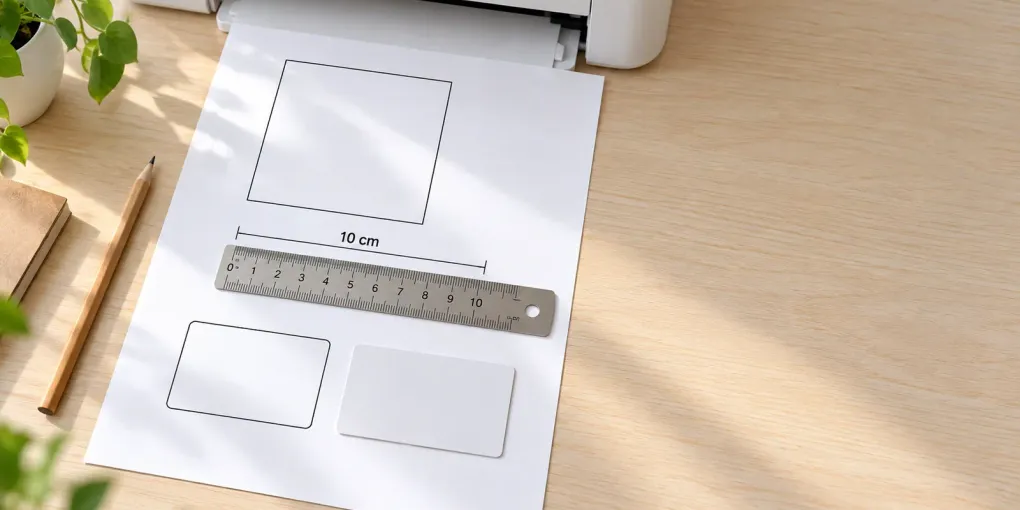
Short answer: to print actual size, open the PDF in a desktop viewer, choose Actual size (or scale 100%) in the print dialog, make sure the paper size in the dialog matches the paper size of the file, and turn off every option with “fit”, “shrink” or “borderless” in its name. Then measure: a printed 100 mm line should measure 100 mm, and a bank card laid on a printed 85.6 mm line should match it exactly.
Most advice on how to print actual size stops at “untick Fit to page”. That fixes one cause out of four. A page can also shrink because the paper size is wrong (A4 file on Letter paper prints at 94%), because the printer driver enlarges or reduces the data for borderless printing, or because you printed from a phone that has no scale control. This guide covers all four, with the menu names for each app and a test you can finish in 30 seconds. Updated 2026-10-16.
How to print actual size in 6 steps
- Open the PDF in a desktop viewer such as Adobe Acrobat/Reader, Chrome, Edge or macOS Preview, not in a chat app or a phone preview.
- Check the paper size of the file. Most PrintMigo files are US Letter (8.5 × 11 in) or A4 (210 × 297 mm), whichever you picked in the tool.
- Set the same paper size in the print dialog. A4 file, A4 paper. Letter file, Letter paper.
- Choose Actual size / 100%. Anything called Fit, Fit to page, Shrink oversized pages, Scale to paper or Fit to printable area changes the size.
- Turn off borderless printing and “pages per sheet” (keep it at 1), and switch off headers and footers if you print from a browser.
- Print page 1 on plain paper and measure it (see the ruler test below) before you use card stock, label sheets or fabric-pattern paper.
How to print actual size in each app
Menu names move between versions, so look for the option that means “no scaling”. The paths below come from the vendors’ own help pages unless a note says otherwise.
| App | Where to click | Choose |
|---|---|---|
| Adobe Acrobat / Reader | Print → Page Sizing & Handling → Size | Actual size. Adobe says it prints without scaling, and pages that don’t fit the paper are cropped. Avoid Fit and Shrink oversized pages (Adobe). |
| Microsoft Edge | Print → More settings → Scale to print | Actual size (not “Fit to printable area”). Set Margins and Headers and footers here too (Microsoft). |
| Google Chrome | Print → More settings → Scale | Actual size if the list shows it, otherwise Custom → 100. Avoid anything starting with “Fit”. Chrome has no public help page for this menu, so check the preview. |
| Firefox | Print → Scale | 100%, not “Fit to page width”. Labels were read from Firefox’s own translation files and can change between versions. |
| macOS Preview | Print → Preview section → Scale | Type 100% and leave Scale to Fit unticked. Apple lists both controls (Apple). Some Mac users report the scale resetting after they change paper size, so set the paper first. |
| Microsoft Word | File → Options → Advanced → Print | Clear Scale content for A4 or 8.5 x 11” paper sizes if Word keeps resizing your document (Microsoft). |
If a PDF still prints small from a browser, download it and open it in Acrobat or Reader. Browsers’ built-in PDF viewers hide some options, and Acrobat’s Print as image (Print → Advanced) is a last-resort workaround that can grey out other options.
How to print actual size from a phone or tablet
Be realistic: on iPhone and iPad, Apple’s AirPrint help page lists only printer, number of copies and page range, and says nothing about scale. Canon notes that the paper size is chosen by the app and region. On Android, the system print panel depends on the print service you installed, and the developer API defaults to “fill” rather than “fit” or “actual”.
That means a phone print is best effort. If actual size matters (cut lines, templates, sewing patterns), print from a computer, or use your printer maker’s own app and measure the result. Treat the ruler test as mandatory when you print from a phone.
How to print actual size without printer-driver surprises
Even with the right setting in the viewer, the driver can resize the data afterwards.
- Borderless printing works by enlarging the image slightly so that it runs off the paper. Epson’s Windows driver has an Expansion slider (“Min” keeps the whole image, “Max” crops the edges), and Canon’s has Amount of Extension. Canon says that at the smallest setting the image is printed at full size. Turn borderless off for anything you will measure or cut (Epson, Canon).
- “Fit to page” or “Scale to paper” in the driver tab can undo your 100%. Open Printer properties and look for a resize option set to “Actual size” or “None”.
- Pages per sheet must be 1.
- Unprintable margins: home printers can’t print to the paper edge. Epson specifies 3 mm on all sides for some models, and some keep 14 mm at the bottom unless you choose “Minimize Margins”. Anything inside that strip is cut off at 100%.
Letter vs A4: why a page shrinks even with “Fit” off
Letter is 215.9 × 279.4 mm and A4 is 210 × 297 mm. Letter is 5.9 mm wider than A4 but 17.6 mm shorter, so a page fitted onto the other format is limited by its height:
| What you print | On what paper | Scale with “Fit” (0 mm margin) | With 3 mm margin | A 100 mm line prints as |
|---|---|---|---|---|
| A4 file | US Letter | 94.1% | 92.1% | 94 mm / 92 mm |
| Letter file | A4 | 97.3% | 94.5% | 97 mm / 94 mm |
| A4 file | A4 | 100% | 97.1% | 100 mm / 97 mm |
| Letter file | Letter | 100% | 97.2% | 100 mm / 97 mm |
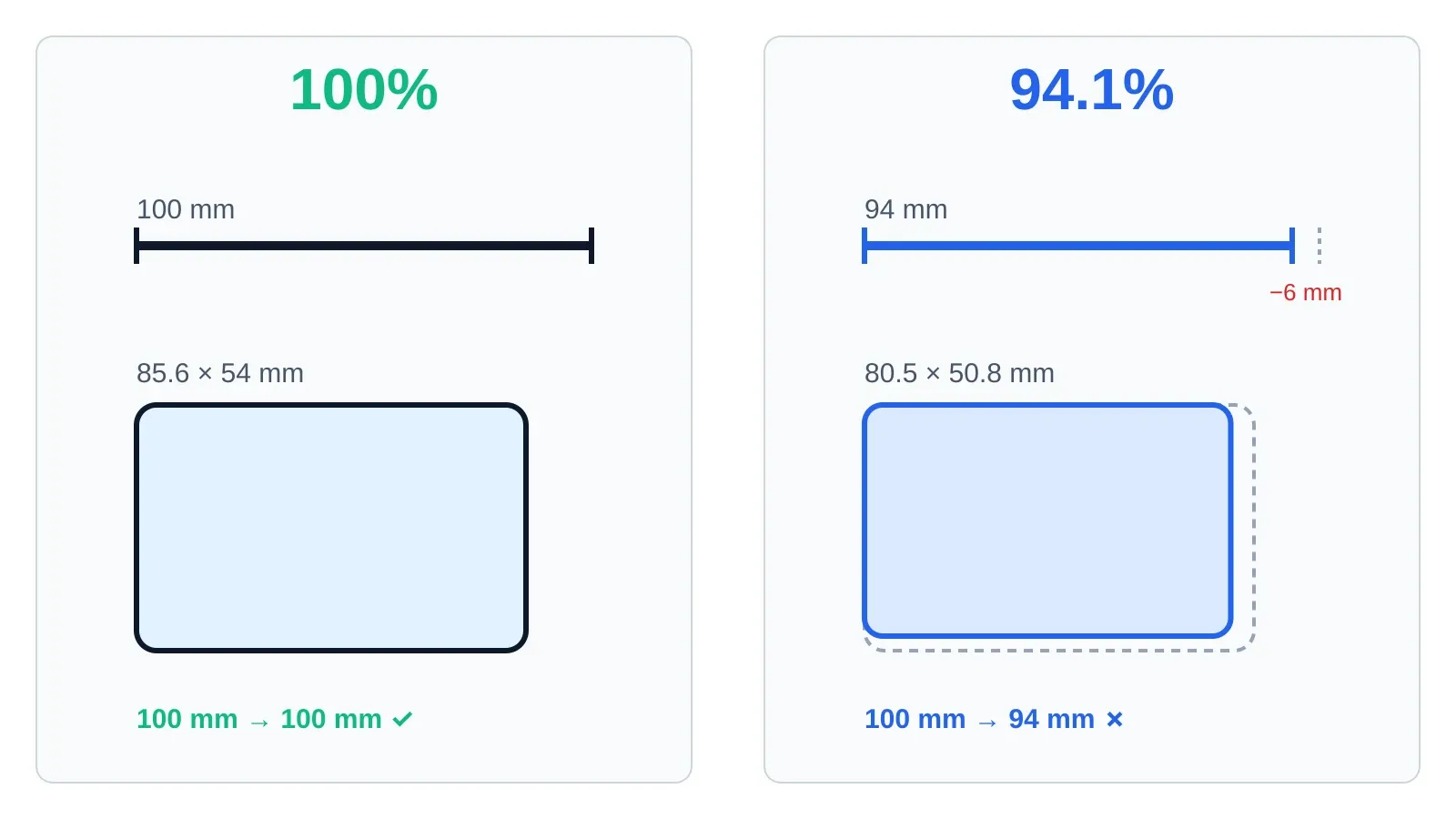
Same file, two settings: at 94.1% a 100 mm line prints 94 mm long and a bank-card outline shrinks to about 80.5 × 50.8 mm.
(The figures are our arithmetic from the paper sizes: the smaller of width ratio and height ratio wins.) Two things follow. First, always match paper size to file size. Second, even on the right paper, “Fit to printable area” costs about 3% with a 3 mm margin and about 6% with a 6.35 mm margin, which is why “fit” shrinks everything a little.
If you pick Actual size on the wrong paper, nothing is scaled and the overflow is cropped, so a Letter-size design on A4 loses its bottom strip.
How to check you printed actual size: the ruler and card test
You do not need a special test page. Use any printed line of known length, or the printout itself.
- Pick something printed with a known size: a 100 mm line, a 10 cm test square, a label or card outline whose size you know.
- Use a bank card. An ISO/IEC 7810 ID-1 card is 85.60 × 53.98 mm (Wikipedia summary). Lay it on a printed 85.6 mm line, rectangle or label; if the line is shorter, you printed under 100%. At 94.1% the card’s outline would be about 80.5 × 50.8 mm.
- Use a rigid ruler, not a soft tape. Sewing-pattern makers recommend this.
- Correct a small error: custom scale = (wanted ÷ measured) × current scale. A 100 mm line that measures 94 mm means 100 ÷ 94 × 100 = 106% in the Custom scale box. One millimetre in 100 is normal printer tolerance.
For sewing patterns and other templates, print only the page with the test square first; the pattern says how big the square should be (commonly 5 cm, 10 cm or 4 in) (By Hand London).
Why a PDF still doesn’t print at actual size: quick fixes
| What you see | Likely cause | Fix |
|---|---|---|
| Everything is 94–97% of the right size | Fit to printable area, or “Shrink oversized pages” | Choose Actual size / 100% |
| About 94% (A4 file) or 97% (Letter file) | Paper size in the dialog differs from the file | Set the same paper size as the file |
| Slightly too big, edges cut | Borderless printing | Turn borderless off |
| Design is cut at the bottom or right | Actual size on smaller paper, or the unprintable margin | Use matching paper; keep content 5 mm inside the edge |
| Size changes every time you open the file | Preview or viewer resets scale | Set paper size first, then scale; use Acrobat |
| Phone print is wrong, no scale option | The print sheet has no scale control | Print from a computer |
| A browser date or URL appears and shifts the layout | Headers and footers on | Turn them off in More settings |
Ask an AI how to print actual size
Give the AI your file’s paper size, your paper, your printer brand and the app you print from. For example: “I have an A4 PDF, Letter paper and a Canon inkjet. How do I print actual size from Chrome on Windows, and what else could shrink the page?” An AI can list the usual options but cannot see your driver, so run the ruler test on the result.
Where actual size matters: tools that make exact-size PDFs
PrintMigo’s generators export a PDF at the paper size you select, so the layout only prints correctly if you print it at 100%.
- Labels: the free label maker and the address label maker place labels on the sheet grid, which is why even 1% scaling pushes text out of the label. Our guide to printing labels at home covers test prints and offset fixes, and Avery label sizes lists the sheet codes.
- Flashcards: the flashcard maker draws cut lines for 4 to 12 cards per page, and its own tips say to use actual size or 100% and to print a test page first.
Both run in the browser without sign-up or watermark.
How to print actual size: FAQ
What does “actual size” mean when printing? The file’s physical size is not changed: a 100 mm line prints as 100 mm. In Acrobat it prints without scaling, and parts that don’t fit the paper are cropped.
Is “Actual size” the same as 100%? Yes for practical purposes. Both mean no scaling. “Fit” and “Shrink” modes choose a scale for you.
Why does my printout come out smaller than the PDF? Most often because Fit to printable area is on, the paper size doesn’t match the file, or borderless printing is on.
How do I print actual size in Chrome? Print → More settings → Scale, then choose Actual size if it is listed, or Custom with 100. Turn off headers and footers and check the paper size.
How do I print actual size on a Mac? Open the PDF in Preview or Acrobat, choose File → Print, and in Preview set Scale to 100% with Scale to Fit off.
Can I print actual size from an iPhone or Android? Not reliably. Apple documents no scale control in AirPrint, so print from a computer and measure the result.
Why is my A4 file smaller on Letter paper? A4 is 297 mm tall and Letter 279.4 mm, so “fit” scales the page to about 94%. Choose A4 paper, or generate the file in Letter.
How accurate is a home printer? Within about 1 mm on 100 mm is normal. If the error is larger, change the scale by the ratio from the ruler test.
Ready to print an exact-size sheet? Open the free label maker or the flashcard maker, download the PDF, choose Actual size / 100%, and measure one printed line before you use the real paper.