Printable Guide
Avery Label Sizes: Chart of 5160, 5163, L7160 and More (US Letter & A4)
Avery label sizes in one chart: 5160, 5163, 5167, round and square templates for US Letter, plus A4 L7160 and L7163, with labels per sheet and best uses.
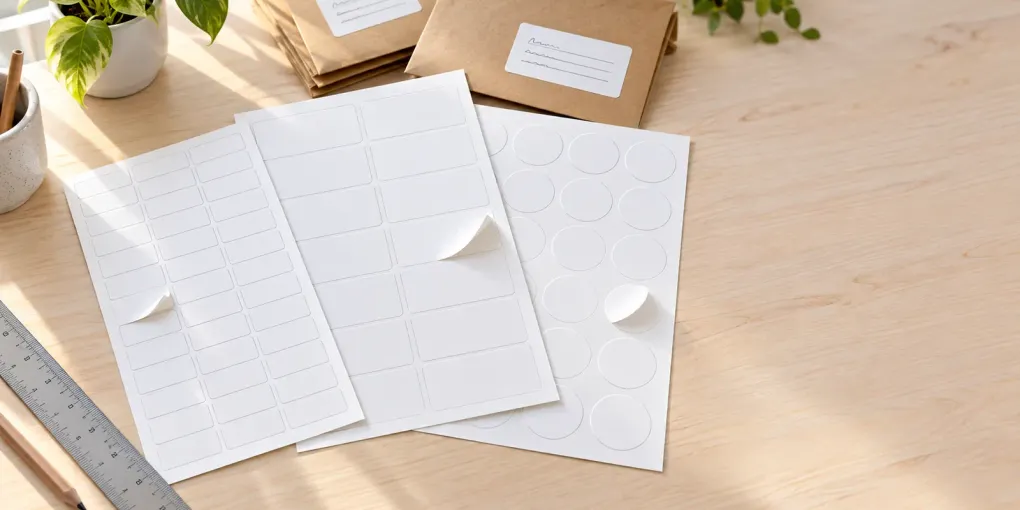
Short answer: the most common Avery label sizes are 5160 (1 × 2⅝ in, 30 per sheet, the standard address label), 5163 (2 × 4 in, 10 per sheet, shipping), 5167 (½ × 1¾ in, 80 per sheet, return address) and 22806 (2 in square, 12 per sheet) on US Letter paper, and L7160 (63.5 × 38.1 mm, 21 per sheet) and L7163 (99.1 × 38.1 mm, 14 per sheet) on A4. The number printed on your pack tells you which one you have, and a US Letter template and an A4 template are never interchangeable.
Most pages about Avery label sizes stop at a chart. This guide adds what you actually need to buy and print: which size suits which job, what the extra digits in 5260, 8160 or 18160 mean, how to find your size if the box is gone, which A4 sizes match Herma, Apli, Zweckform and Pimaco, and how to print without the text drifting off the label. Updated 2026-10-16.
Avery label sizes at a glance: pick by what you’re labeling
If you only want to know what to buy, start here.
| What you’re labeling | Size to look for | Avery template | Per sheet |
|---|---|---|---|
| Envelope address, mailing list | 1 × 2⅝ in | 5160 (US Letter) | 30 |
| Return address, small stickers | ½ × 1¾ in | 5167 | 80 |
| Large address, file folders, binders | 1⅓ × 4 in | 5162 | 14 |
| Shipping, packages, food or product labels | 2 × 4 in | 5163 | 10 |
| Big shipping or product label | 3⅓ × 4 in | 5164 | 6 |
| Jars, lids, gift tags | 2 in round or square | 22807 round, 22806 square | 12 |
| Address labels on A4 | 63.5 × 38.1 mm | L7160 | 21 |
| Larger A4 address / parcel labels | 99.1 × 38.1 mm | L7163 | 14 |
Sizes and uses come from Avery’s own template pages, for example 5160, 5163 and 22806. Avery’s address label guide calls 1 × 2⅝ in the standard envelope size, with room for 3 to 4 lines of text.
Avery label sizes chart: US Letter (8.5 × 11 in)
These templates are made for US Letter paper, used in the US, Canada and Mexico.
| Template | Size (in) | Size (mm) | Grid | Per sheet | Typical use |
|---|---|---|---|---|---|
| 5160 | 1 × 2⅝ | 66.7 × 25.4 | 3 × 10 | 30 | Address, product labels |
| 5161 | 1 × 4 | 101.6 × 25.4 | 2 × 10 | 20 | Address, ID labels |
| 5162 | 1⅓ × 4 | 101.6 × 33.9 | 2 × 7 | 14 | Address, file folders |
| 5163 | 2 × 4 | 101.6 × 50.8 | 2 × 5 | 10 | Shipping, mailing |
| 5164 | 3⅓ × 4 | 101.6 × 84.7 | 2 × 3 | 6 | Shipping, food labeling |
| 5165 | 8½ × 11 | full sheet | 1 × 1 | 1 | Shipping, one big label |
| 5167 | ½ × 1¾ | 44.5 × 12.7 | 4 × 20 | 80 | Return address |
| 5195 | ⅔ × 1¾ | 44.5 × 16.8 | 4 × 15 | 60 | Return address |
| 5168 | 3½ × 5 | 88.9 × 127 | 2 × 2 | 4 | Shipping |
Three of these are worth remembering. 5160 fits most mailing lists. 5163 is the usual shipping label. 5167 is the small return-address label.
Full list of each template’s compatible numbers (for 5160 that includes 5260, 8160, 15660, 18160, 45160 and dozens more) is on the Avery template page.
Avery label sizes chart: A4 (210 × 297 mm)
A4 labels use a different set of codes. Avery’s UK and EU range is mostly “L” (laser) and “J” (inkjet) codes, and Avery Zweckform in Germany uses four-digit numbers. The figures below come from Avery France, Avery Zweckform and retailer listings, because Avery’s UK template pages could not be read when we checked. Match the number on your pack, not just the size.
| Template | Size (mm) | Grid | Per sheet | Typical use |
|---|---|---|---|---|
| L7160 | 63.5 × 38.1 | 3 × 7 | 21 | Address labels, envelopes C6 |
| L7159 | 63.5 × 33.9 | 3 × 8 | 24 | Small address, stamp-style labels |
| L7161 | 63.5 × 46.6 | 3 × 6 | 18 | Address, parcel labels |
| L7162 | 99.1 × 33.9 | 2 × 8 | 16 | Address labels |
| L7163 | 99.1 × 38.1 | 2 × 7 | 14 | Address labels, DL envelopes |
| L7173 | 99.1 × 57 | 2 × 5 | 10 | Parcel and large address labels |
| L7651 | 38.1 × 21.2 | 5 × 13 | 65 | Mini labels, asset tags |
| Zweckform 3474 | 70 × 37 | 3 × 8 | 24 | Universal labels |
| Zweckform 3475 | 70 × 36 | 3 × 8 | 24 | Universal labels |
| Zweckform 3422 | 70 × 35 | 3 × 8 | 24 | Universal labels |
| Zweckform 3652 | 70 × 42.3 | 3 × 7 | 21 | Universal labels |
The three 70 mm Zweckform sizes (3422, 3474 and 3475) differ by 1 mm in height and are easy to mix up. If you set up a 70 × 37 template but own 70 × 35 sheets, the last row of text will drift onto the gap and the next label.
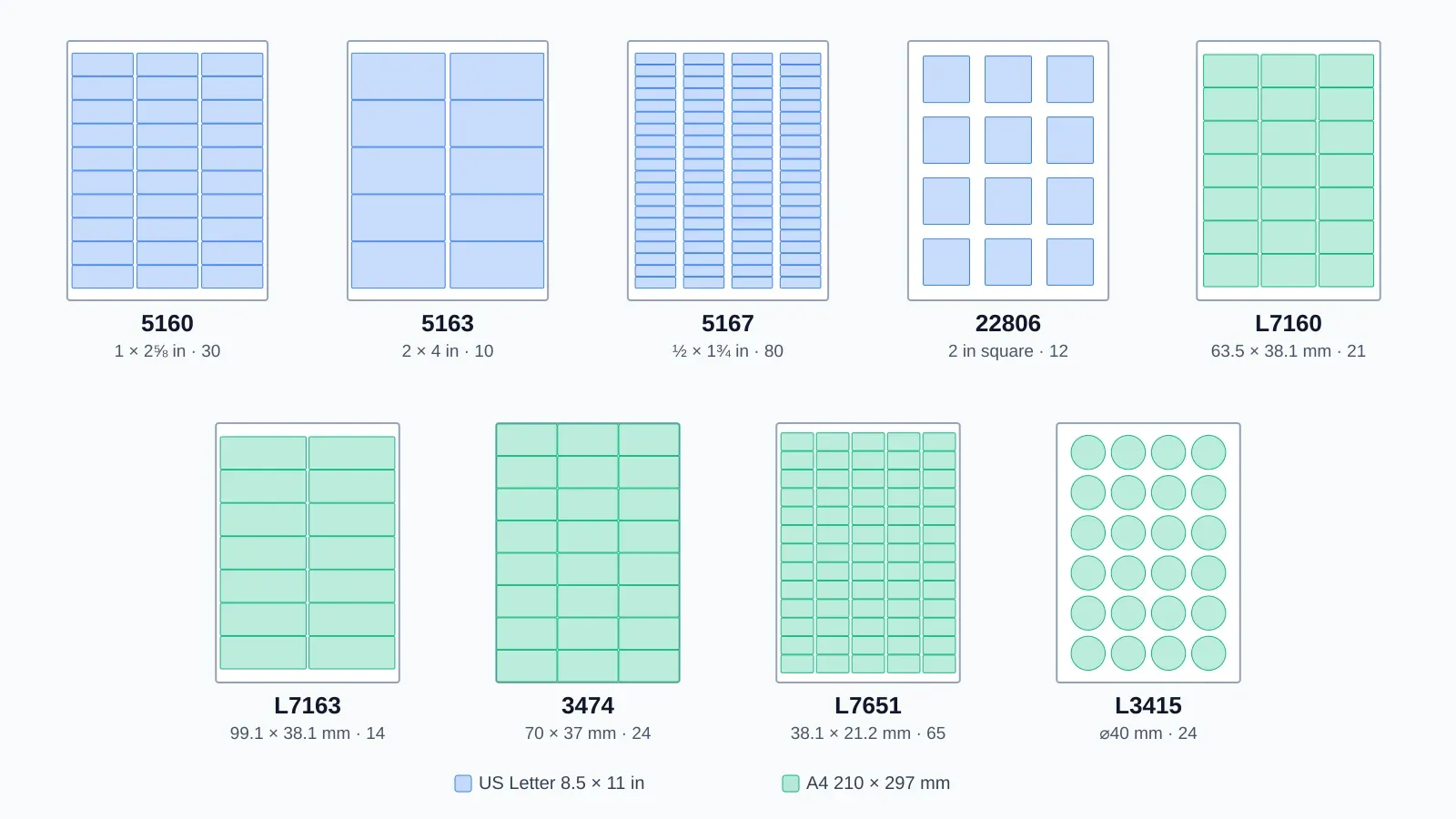
Popular Avery label sizes drawn to scale on their sheets: US Letter in blue, A4 in green.
Round and square Avery label sizes
Round and square labels have their own template numbers.
| Template | Shape and size | Per sheet | Notes |
|---|---|---|---|
| 22805 | 1½ in square | 24 | Print-to-the-Edge |
| 22806 | 2 in square | 12 | Print-to-the-Edge |
| 22807 | 2 in round | 12 | Glossy white |
| 22830 | 2½ in round | 9 | Print-to-the-Edge |
| 8293 | 1½ in round | 20 | Neon |
| 5293 | 1⅔ in round | 24 | Neon |
| 94102 | ¾ in square | 80 | Small stickers |
| L3415 | 40 mm round | 24 | A4 |
| L3416 | 60 mm round | 12 | A4 |
The “Print-to-the-Edge” templates are designed so artwork can reach the cut line. Add a small bleed past the label edge so that a tiny printer shift doesn’t leave a white rim. Avery’s help page on bleed and safe areas recommends about ⅛ in of bleed in its downloadable templates.
What do 5160, 5260, 8160 and 18160 mean in Avery label sizes?
The last digits of an Avery number change the pack, not the size. Per Avery, product numbers change with “pack sizes, colors, materials, adhesives or printer compatibility”.
- 5160 vs 5260: the same label in a different pack size. Avery lists 3,000 labels for 5160 and 750 for 5260, both laser-only (Avery).
- 5160 vs 8160: both are 1 × 2⅝ in and use the same template. 5160 is for laser printers, 8160 for inkjet (Avery).
- 18160: Avery’s address guide lists it as laser and inkjet.
- Other numbers on the compatible list (such as 15660 or 45160): same layout. Check the pack for printer type.
A frequent mistake on third-party sites is claiming that 8160 is a larger label. It is not: 8160 is 1 × 2⅝ in, 30 per sheet.
On A4 the same idea applies: L codes are laser and J codes are inkjet, so L7160 and J8160 are listed with the same 63.5 × 38.1 mm, 21-up layout by UK retailers.
How to find your Avery label size
- Read the pack. The product number (5160, L7160, 3474) is printed on the box and on the sheet backing. This is the number to type into any template.
- Look it up. Search the number on avery.com or on the maker’s site. The template page gives size, count and a compatible-number list.
- No box? Measure one label with a ruler: height, width, then count columns and rows on the sheet. Avery also suggests a printable ruler or wrapping paper around the product, then comparing it with its size guide.
- Check the paper size. A 215.9 × 279.4 mm sheet is US Letter and a 210 × 297 mm sheet is A4. Avery notes its US products are mostly based on Letter (Avery).
US Letter vs A4: why Avery label sizes aren’t interchangeable
L7160 is not “the A4 version of 5160”. 5160 is 30 labels of 1 × 2⅝ in on Letter; L7160 is 21 labels of 63.5 × 38.1 mm on A4. Different count, different grid, different margins.
Scaling one template onto the other paper size (for example “fit to page”) moves every label edge, and the error grows toward the bottom and right of the sheet. Always:
- pick a template with the same number as your pack
- set the paper size in the print dialog to the paper in the tray
- print at 100% (“Actual size”)
Avery label sizes vs Herma, Apli, Zweckform, Pimaco, A-one and Formtec
Other brands often sell the same layout under their own number. The sizes below match exactly in size and count, but brands rarely publish cross-reference tables, so check the pack before you buy.
| Layout | Avery | Other brands with the same size and count |
|---|---|---|
| 63.5 × 38.1 mm, 21 | L7160 / J8160 | Herma 4677 and 5029, Pimaco A4360, A-one 72221, Formtec 3105 |
| 99.1 × 38.1 mm, 14 | L7163 | Pimaco A4363 (99.0 mm wide), Formtec 3108 |
| 38.1 × 21.2 mm, 65 | L7651 | Pimaco A4351 (38.2 mm wide) |
| 70 × 37 mm, 24 | Zweckform 3474 | Herma 4464, Apli 1273 |
| 70 × 36 mm, 24 | Zweckform 3475 | Herma 4360, Apli 1298 |
| 70 × 35 mm, 24 | Zweckform 3422 | Herma 4429, Apli 1272 |
| 1 × 2⅝ in, 30 (Letter) | Avery 5160 | Pimaco 6080 and 6180 (66.7 × 25.4 mm, “Carta”) |
Don’t assume near-misses are drop-in replacements: Herma 4452 is 105 × 42 mm, 14 per sheet, so it is not an L7160 equivalent.
How to print Avery label sizes without misalignment
- Choose the sheet in the tool. In PrintMigo’s free label maker pick your Avery number (try 5160, 5163 or L7160). The grid, margins and paper size are set for you.
- Export the PDF and open it in a PDF viewer, not the browser preview.
- Set scaling to 100% or “Actual size”. Avery says not to use “Fit to Page”, which can shift the design off the label grid (Avery).
- Print a test on plain paper. Lay it over a label sheet and hold both up to a bright window. If the text misses the label by 1–2 mm, use the horizontal and vertical offset fields in the tool and print again.
- Set the paper type to “Labels” or heavy paper if your printer has it.
- Print on the right side. Mark a plain sheet with an arrow to see which side prints and which edge feeds first.
- Match printer and label type. Use laser labels in laser printers and inkjet labels in inkjets, and let inkjet labels dry before stacking.
Keep text about 2–3 mm (roughly ⅛ in) inside the label edge. That is our rule of thumb, not an Avery figure; most home printers also can’t print right to the sheet edge.
Common mistakes with Avery label sizes
- Choosing by size instead of number. 70 × 35, 70 × 36 and 70 × 37 mm labels are three different sheets.
- Mixing paper sizes. Letter is 6 mm wider and 17.6 mm shorter than A4, so a Letter template on A4 paper misses the die-cut labels, more with every row.
- Printing from a browser preview that scales to fit. Use a PDF viewer at 100%.
- Feeding a half-used sheet. Peeled spots can jam a laser printer and shift the print.
- Forgetting the first-label offset. If you reuse a sheet, set the start position so you print only on the labels that remain.
Which Avery label sizes suit your project
- Address labels: 5160 on Letter, L7160 or L7163 on A4. Try the address label maker.
- Pantry labels: 22806 (2 in square) suits jars and bins. See the pantry label maker.
- Spice jar lids: 22807 (2 in round). See the spice label maker.
- Shipping labels: 5163 on Letter, L7173 or L7163 on A4.
Avery label sizes: FAQ
What size is Avery 5160? Avery 5160 labels are 1 × 2⅝ inches (66.7 × 25.4 mm), 30 per US Letter sheet in three columns of ten. It is the standard address label.
What are the most common Avery label sizes? On US Letter: 5160 (30 per sheet), 5163 (10), 5167 (80) and 22806 (12). On A4: L7160 (21 per sheet) and L7163 (14).
Is Avery 5160 the same as 8160? Same size and template; the difference is the printer type. 5160 is made for laser printers and 8160 for inkjet.
What is the A4 equivalent of Avery 5160? There is none. L7160 is 63.5 × 38.1 mm with 21 labels per A4 sheet, a different grid from the 30-up 5160.
How do I find my Avery label size without the box? Measure one label’s width and height, count columns and rows, and compare with the charts above or Avery’s template pages. Check the paper size, too.
Can I print Avery 5160 labels on A4 paper? Not reliably. The 5160 grid is made for Letter. Buy an A4 template such as L7160 instead of scaling.
Which Avery label size is best for shipping? 5163 (2 × 4 in) on US Letter, or L7173 (99.1 × 57 mm) and L7163 on A4.
How do I ask an AI for the right Avery label size? Give it the label’s job, the paper size and the printer: “I need address labels for C6 envelopes on A4, laser printer. Which Avery code and size?” Then verify the number on the product page and load it in a label maker.
Ready to print? Open the free label maker, pick your Avery number, and download a PDF aligned to the sheet. For specific jobs try the address label maker, pantry label maker or spice label maker. No sign-up and no watermark.