Free Certificate of Completion Template with course name, hours and batch names
Fill in the course, the number of hours and the date, paste your attendees' names, and get one certificate of completion per person. Choose a course, training or workshop design, print on Letter or A4, and keep every name in your browser. It is built for trainers, teachers, HR teams and workshop hosts who would rather not retype a Word file for every attendee.
PDF, PNG and print · US Letter and A4 · works on a phone
How to print themFill in your certificate of completion template
The course design is selected. Switch to training or workshop, type the course name and hours, paste your list of names, and print at 100%. Use the preview arrows to check every attendee before you export.
Pick a design
Template librarySelected template: Completion – CourseTemplates are collapsed by default. Open the library to choose a certificate type, default wording, theme, and decoration.
Certificate text
Certificates from a list of names
Paste one name per line to get one certificate per name (up to 100). Add a second column after | or a tab for that person's own achievement text, and a third for their own date. Pasting two or three columns straight from Excel or Google Sheets works too, or upload a CSV file.
Certificate settings
Printable certificate preview
Certificate of Completion
Printing notes
- Use actual size or 100 percent scale in the print dialog so the certificate border stays inside the printable area.
- PDF and PNG export use the same SVG certificate preview, including borders, backgrounds, decorations, and line breaks.
- Batch mode only creates local multi-page PDF output from pasted names. It does not create accounts, databases, email sends, certificate verification, or public hosting.
- For official diplomas, licenses, qualifications, notarized papers, legal certificates, or verified credentials, use the issuing institution's official process instead.
- For certificates people keep, print on 28–32 lb bond or 65–110 lb cardstock (105–300 g/m²) and run one test page on plain paper first.
Live certificate preview - Page 1
Certificate of completion template: quick facts
Short answers for trainers, teachers, HR teams and workshop hosts. Everything below is true for the free version, which is the only version.
- Price
- Free, with no paid tier or download fee
- Account
- Not required
- Watermark
- None
- Export formats
- PDF (all certificates in one file), PNG (one at a time) and direct print
- Paper sizes
- US Letter and A4
- Supported sizes
- Full-page landscape or portrait, on US Letter (8.5 × 11 in) or A4 (210 × 297 mm)
- Privacy
- Runs in your browser; nothing you type is uploaded
- Languages
- 8 languages: English, Chinese, Spanish, Portuguese, French, German, Japanese, Korean
- Designs
- Course (blue), Training (black and white) and Workshop (emerald), plus 12 more certificate types
- Course details
- Course name and hours as free text, such as '8 hours' or '0.8 CEU (8 contact hours)', plus date, signer and signature lines. Both fields are optional and shrink to fit if the text is long
- Batch names
- One certificate per line, up to 100 per PDF; paste columns from Excel or Google Sheets, with an optional own date per person
- Status
- A certificate of completion is a record that someone finished a course; it is not an accredited credential or a CEU award unless your organization is approved to issue one
- Last updated
- October 16, 2026
Best for
- Trainers and HR teams who give every attendee a record of a course or in-house training
- Teachers and workshop hosts handing out a certificate of completion on the last day
- Clubs, community groups and online course creators who need 10–100 certificates quickly
Not the best fit for
- Accredited CEU, PDH or licensing certificates that need a provider approval number
- Certificates that need a QR code, a verification page or a unique ID per person
- Official diplomas, transcripts or professional certifications
How it compares
- Canva and Adobe Express
- Polished designs, but you edit one name at a time, need an account and some elements or bulk creation are paid.
- Word, PowerPoint and Google Docs
- Free certificate of completion files, but every extra name means retyping the page or setting up a mail merge.
- Bulk generators with accounts
- Good for QR verification and email delivery, but many add a watermark to the free batch or ask for a work email.
Why this certificate of completion template is quick to use
Three things most free certificate of completion downloads leave out.
Course, training and workshop designs, ready to edit
Pick a course, training or workshop certificate of completion. Each one starts with its own border, color and wording, such as 'has successfully completed', and you can change the title, issuer and signer in a few clicks. Every design works on Letter and A4. Switch designs at any time and your wording stays in place.
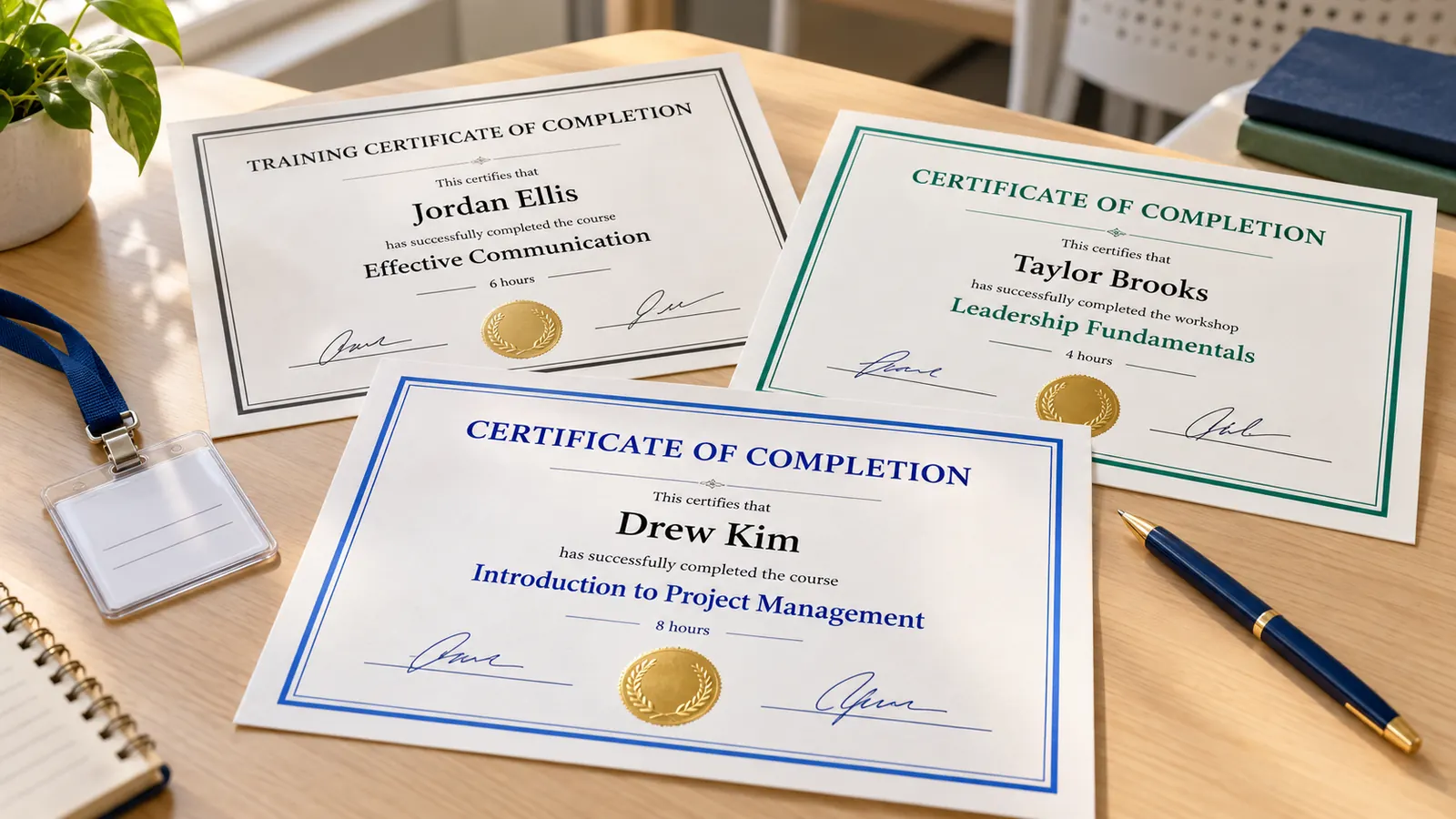
Course name and hours printed under the wording
Type the course name and the hours, for example 'Workplace Safety Basics' and '4 contact hours'. They print in bold under the completion statement, so the certificate of completion says exactly what was finished and how long it took. Leave both empty for a simple certificate. Long course names shrink to fit instead of running off the page.

Paste a list of names and get one certificate each
Paste one name per line, or paste columns from Excel or Google Sheets, and each name becomes its own page of the PDF. Add a date after the name if people finished on different days. Up to 100 certificates of completion per PDF, all made in your browser. Use the preview arrows to check each page before printing.

What this certificate of completion template can do
Everything runs in your browser, so names of students and staff are never uploaded. There is nothing to install and nothing to pay for.
Three ready presets
Course, training and workshop designs, each with its own border, color and wording.
Course name and hours
Two optional fields that print the course and its length under the completion statement. Leave them empty if you only need a simple thank-you certificate.
Batch names
One certificate per line, up to 100 per PDF, with an optional date for each person.
Signature lines
Ruled lines for the signer and the date, ready for a pen after you print.
Letter or A4
Landscape or portrait on US Letter or A4, with a safe print margin built in.
PDF, PNG and print
Multi-page PDF, one PNG per certificate or direct print, with no watermark.
How to make a certificate of completion template in five minutes
From a blank form to a stack of printed certificates ready to sign. Most people finish in under five minutes, even with a long list of attendees.
Choose the type of certificate of completion
Tap Course for an online or classroom course, Training for in-house or compliance training and Workshop for a one-day event. Edit the title and the issuer so they match what you teach. If you are not sure which wording fits, completion is the safest choice for anything with a start and an end.
- Say what was completed: 'has successfully completed' is clearer than 'is awarded to'.
- Use 'certificate of attendance' instead if people only showed up and were not assessed.
Add the course name and hours
Type the course name and the length, such as '8 hours' or '0.8 CEU (8 contact hours)'. One IACET CEU equals 10 contact hours of 60 minutes, but only approved providers can award CEUs, so write plain hours if you are not one. Write the date the course ended, or a range such as 'June 10–12, 2026' for a multi-day course, in the date field.
- Add the start and end date in the date field for multi-day courses.
- Do not write a CEU, PDH or credit value unless your organization is approved to award it.
Paste your list and add the signer
Paste one attendee per line, or copy a column from Excel or Google Sheets, and check each page with the preview arrows. Type the signer's name and title, such as the instructor or program director, and switch on signature lines. Names with accents and non-Latin characters print correctly, and long names shrink to fit on one line.
- Use Sort A–Z to hand the stack out alphabetically.
- Letter is the default in the US and Canada, A4 in the UK, Australia and most other countries.
Print at 100% and sign
Download the PDF or click Print, choose Actual size or 100%, never Fit to page, and print page 1 on plain paper first. Then print the batch on 24–32 lb (90–120 g/m²) paper or light cardstock and sign each certificate by hand. Keep a PDF copy of the batch so you can reprint a lost certificate later.
- Keep the printer's borderless option off so the border is not cropped.
- Sign after the toner is dry so the pen does not smudge.
Certificate of completion template FAQ
What to include, what hours to write and how to make many certificates at once.
Yes. There is no sign-up, no trial, no watermark and no limit on printing. The certificates are drawn in your browser and the PDF or PNG goes straight to your device, so the names you type or paste are never uploaded. You can reuse it for every course you run, as many times as you like.
Include the title, the attendee's full name, a completion statement such as 'has successfully completed', the course name, the date, the issuer and a signature with the signer's title. Optional extras are the course hours, a location and a certificate number. Only add accreditation details if your course is really accredited. Keep the wording short enough to read at a glance, since the name and the course are what people look for.
A certificate of attendance shows that someone was present, often with a minimum attendance such as 80%. A certificate of completion says they finished a course or its requirements. Choose the wording that matches what you can honestly confirm. If a session had a quiz or a project, completion or achievement is the more accurate word.
Type the length in the Course hours field, for example '8 hours', '4 contact hours' or '2 days'. It prints under the course name. One IACET CEU equals 10 contact hours, but only an approved provider can award CEUs, so otherwise write plain hours. A multi-day course can use '2 days' or '16 hours' in the same field.
A certificate of completion is a record that a course was finished. It is not an accredited credential, a degree or a professional certification unless an approved body issued it. Whether an employer or regulator accepts it depends on them, so ask before you rely on it. Accreditation applies to institutions, and certification is a credential from a third party, which is a different thing.
Paste one name per line in the names box, or paste two or three columns from Excel or Google Sheets. Each line becomes one page, up to 100 in one PDF. A third column can hold a different completion date for each person. Use Remove duplicates if a name was pasted twice, and keep the original sheet so you can reprint later.
Most are full-page: US Letter (8.5 × 11 in) in the US and Canada, A4 (210 × 297 mm) in the UK, Australia and most of the world. Landscape is the usual direction, and portrait works for framed copies. The page sets a safe print margin, so a home printer does not crop the border.
The instructor, program director or head of the organization that ran the course signs it. Add the signer's name and title, and switch on signature lines so there is a ruled space for a handwritten signature after printing. Many organizations also add a second signature from the host, such as a manager or school principal.
Yes. Download the PDF, choose Actual size or 100%, print one test page on plain paper, then print on 24–32 lb (90–120 g/m²) paper or light cardstock. Keep the borderless option off so the border is not cropped. Colored borders use a lot of ink, so choose the black-and-white training design for big batches.
Yes. Names, dates and course details are only used to draw the certificates in your browser. Nothing is sent to a server, and closing the tab clears the list, so download the PDF if you want to print again.
Print your certificate of completion template now
Pick a course, training or workshop design, type the course name and hours, and paste your list of names. Everything works on a phone, a tablet or a laptop.
Free, no sign-up, no watermark, and the names stay in your browser.
Need an award instead? The same Certificate Generator has award certificates with signature lines.