Free Gift Certificate Template with your logo, expiry date and numbered serials
Pick a general, salon & spa or restaurant design, type the amount or service, upload your logo and print three gift certificates per page. Serial numbers count up by themselves, you can paste a list of names for a batch, and everything stays in your browser.
PDF, PNG and print · US Letter and A4 · works on a phone
How to print and cut themFill in your gift certificate template
The general gold design is selected. Switch to salon & spa or restaurant, add the business name, logo, amount or service and a valid-until date, then set how many numbered certificates you need and print at 100%.
Pick a gift certificate style
Template librarySelected template: Gift Certificate – GeneralTemplates are collapsed by default. Open the library to choose a certificate type, default wording, theme, and decoration.
Gift certificate details
Serial numbers
Each certificate gets the next number: GC-0001, GC-0002 and so on. With a pasted list, one certificate is made per line and the number of certificates is ignored.
Certificates from a list of names
One gift certificate per line (up to 100). Separate columns with | or Tab: recipient | amount or service | valid until. Blank columns use the values above. Paste two or three columns from Excel or Google Sheets, or upload a CSV.
Certificate settings
Printable certificate preview
Gift Certificate
Printing notes
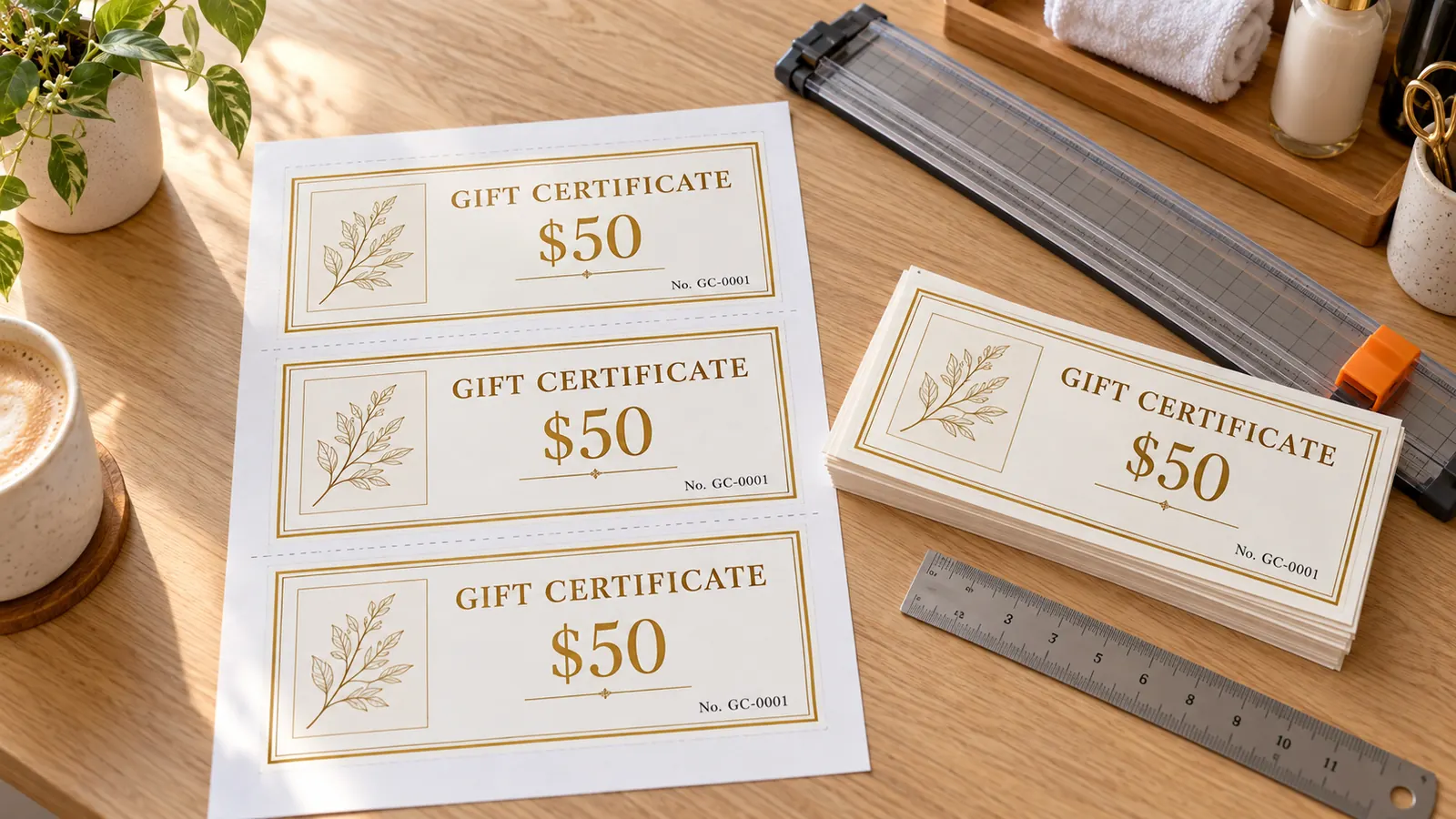
- Print at Actual size (100%). Three certificates fit one Letter or A4 page; cut along the dashed lines with a paper trimmer.
- Serial numbers are for your own records: keep a list of numbers, amounts, buyers and redemption dates. They do not stop copying, so a unique number you log yourself is safer.
- Write the expiry date and your phone number or website on the certificate. Many places limit or forbid expiry dates, so check your local gift certificate rules before you print.
- This page only makes a printable design. It does not hold money, track balances or verify certificates.
Live certificate preview - Page 1
Gift certificate template: quick facts
Short answers for small businesses and anyone giving a handmade gift certificate.
- Price
- Free, with no paid tier or download fee
- Account
- Not required
- Watermark
- None
- Export formats
- PDF (all pages in one file), PNG (one page at a time) and direct print
- Paper sizes
- US Letter and A4
- Supported sizes
- Each certificate is 190 × 83 mm (7.5 × 3.3 in), three per Letter or A4 page; or one large landscape certificate per page
- Privacy
- Runs in your browser; nothing you type is uploaded
- Languages
- 8 languages: English, Chinese, Spanish, Portuguese, French, German, Japanese, Korean
- Fields
- Business name and logo, amount or service, to, from, message, valid until, date issued, signer and terms
- Serial numbers
- Prefix plus counter from any start number (GC-0001, GC-0002 …) for up to 60 certificates, or one per line of a pasted list up to 100
- Designs
- General (gold), Salon & Spa (rose floral) and Restaurant (black and white serif), with 6 borders, 7 color themes and 4 font styles
- Best paper
- 65–110 lb cardstock (176–300 g/m²); run one test page on plain paper first
- Last updated
- October 16, 2026
Best for
- Salons, spas, cafes and studios that sell 10–60 paper certificates a year
- Teachers, coaches and parents making a one-off gift certificate for a service or an experience
- Anyone who wants numbered certificates without a Word table or a design account
Not the best fit for
- Selling gift cards that hold a balance, which needs a point-of-sale system
- Certificates that must be impossible to copy or forge
- Print shop orders with bleed and crop marks
How it compares
- Canva
- Huge design library, but you need an account, some elements are Pro-only and every serial number is typed by hand.
- Microsoft Word templates
- A free three-per-page Word template, but it needs Word and you retype each number and date.
- Square
- Free PDFs that ask for your email address first; this page needs no email and keeps your logo on your device.
Why this gift certificate template saves an hour
Three things most free gift certificate downloads leave out.
Three gift certificates on one sheet, already laid out
Each certificate is 190 × 83 mm, so three fit on one portrait Letter or A4 page with dashed cut lines between them. No Word table, no nudging boxes: type your business name, amount and message once and all three fill in. Prefer one big certificate? Switch to one per page in landscape and it scales up.
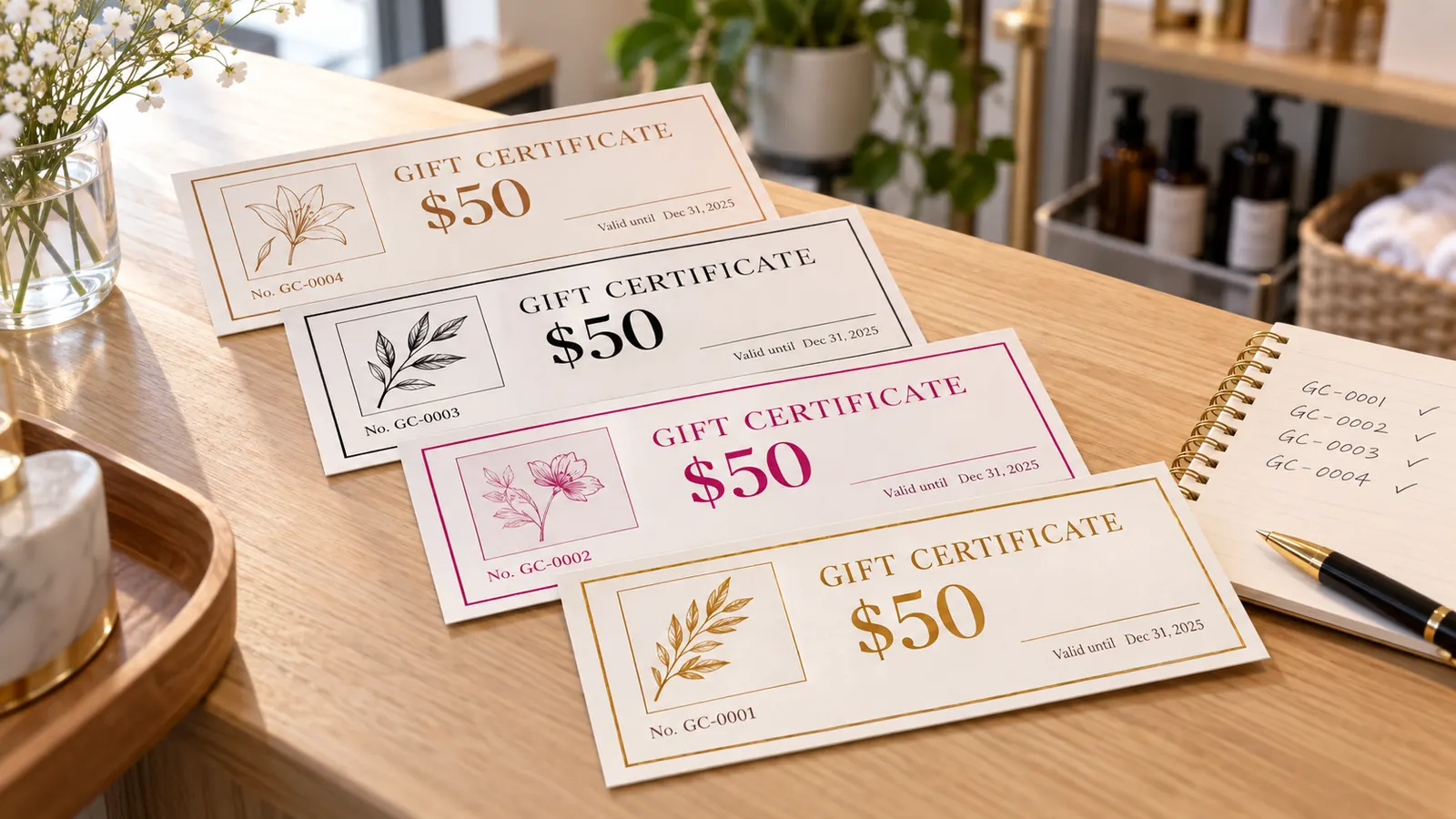
Numbered serials and an expiry date on every certificate
Set a prefix such as GC- and a start number, say how many you need, and the template counts up: GC-0001, GC-0002, GC-0003. Add a valid-until date and a terms line, or paste a list with a recipient, amount and expiry on each row for a batch of up to 100.
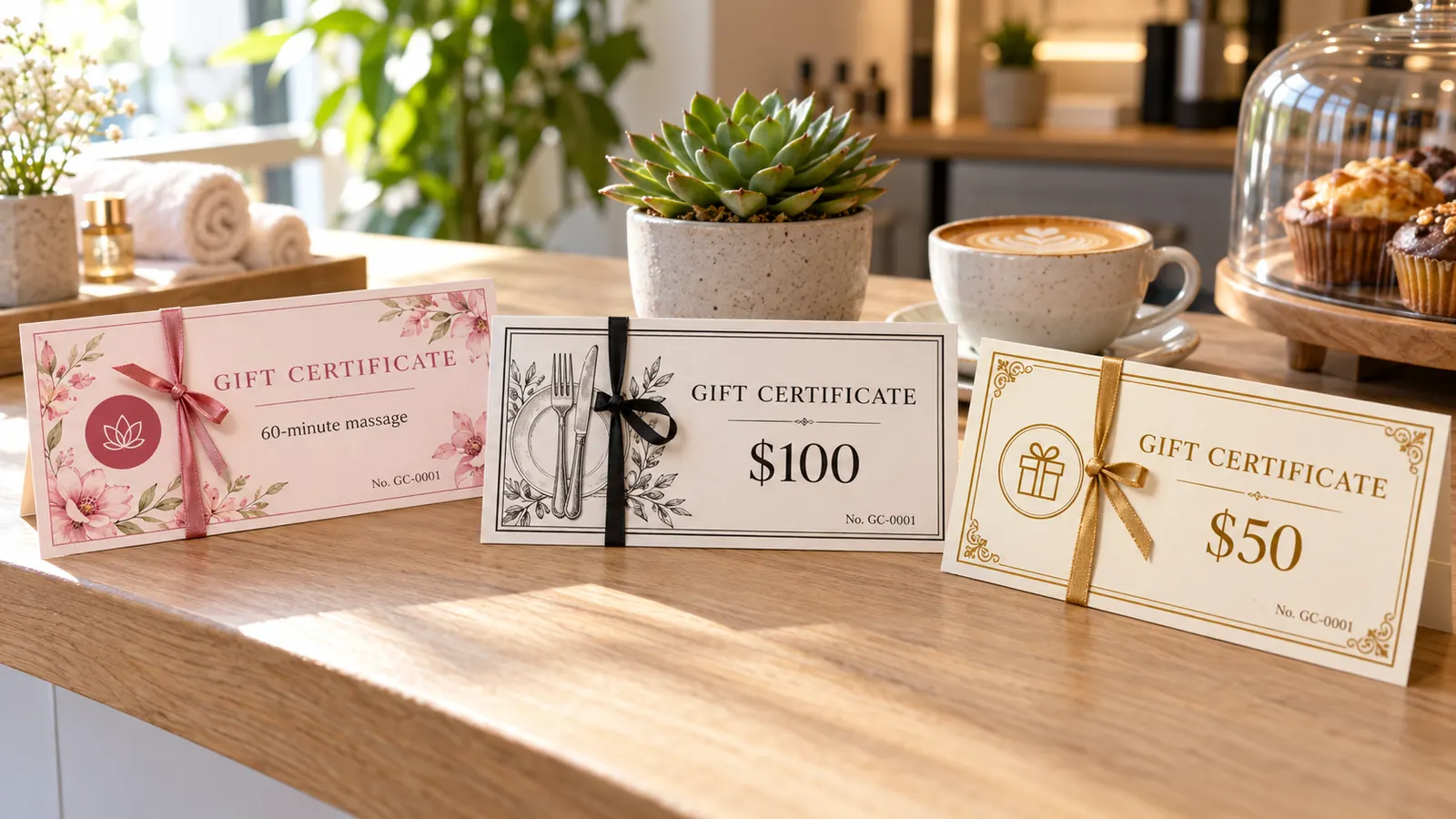
Salon & spa, restaurant and general designs with your logo
Start from a rose floral spa design, a black-and-white serif restaurant design or a gold general one, then upload your logo (PNG, JPG, WebP or SVG) and change the border, color theme and font. Your logo is read inside the browser and is never uploaded.
What this gift certificate template can do
Everything runs in your browser, so your logo, names and amounts stay on your computer.
Three per page
190 × 83 mm landscape certificates stacked on Letter or A4 with dashed cut lines, or one large certificate per page.
Auto-numbered serials
Prefix plus counter from any start number, up to 60 certificates in one go.
Your logo
Upload a PNG, JPG, WebP or SVG up to 5 MB; it is resized in your browser and never sent anywhere.
Three ready designs
General gold, Salon & Spa rose and Restaurant black-and-white, with 6 borders and 7 color themes.
Expiry and terms
A valid-until date, a date-issued line, a signer and a small-print terms line on each certificate.
PDF, PNG and print
Multi-page PDF, one PNG per page or direct print, at 100% size with no watermark.
How to make and print a gift certificate template at home
From a blank page to a cut stack of numbered certificates in about ten minutes.
Choose a design and add your business details
Tap General, Salon & Spa or Restaurant. Type your business name, upload your logo and set the title, for example Spa Gift Certificate. Keep the message short; two lines is the limit on the certificate.
- A square or wide logo with a transparent background looks cleanest.
- Use your shop's real name and phone number so the receiver knows where to book.
Set the amount, expiry and terms
Enter an amount such as $50 or a service such as 60-minute massage, and a valid-until date. Add terms like not redeemable for cash. Check your local gift certificate rules for minimum validity before you print.
- In the US, federal rules generally bar gift certificates from expiring within 5 years; California bans most expiry dates.
- A certificate for one named service can follow different rules in some places.
Number your certificates
Choose a prefix, a start number and how many certificates you want. For named recipients, paste a list with one recipient, amount and expiry per line. Check the preview page by page.
- Keep a spreadsheet of numbers, buyers, amounts and redemption dates; the number alone does not prevent copying.
- Start the next batch at a higher number so numbers never repeat.
Print at 100%, cut and finish
Download the PDF or click Print, choose Actual size or 100%, never Fit to page, and print page 1 on plain paper first. Then use 65–110 lb cardstock, cut along the dashed lines and add a signature, a stamp and a ribbon.
- A paper trimmer cuts cleaner than scissors.
- Sign each certificate by hand; it feels more personal and is harder to fake.
Gift certificate template FAQ
What to write, how long it lasts, how to number it and how to print it.
Yes. There is no sign-up, no email gate, no trial and no watermark. The certificates are drawn in your browser and the PDF or PNG is saved straight to your device, so your logo and recipient names are never uploaded.
Add your business name and logo, the amount or service, who it is for and from, a unique serial number, a valid-until date, a short terms line, your contact details and a signature. In the US, the federal rule for gift certificates also expects the expiry date, or a statement that funds do not expire, plus a toll-free number to appear on the certificate.
It depends on where you are. Under US federal rules (Regulation E), a gift certificate generally cannot expire within 5 years of issue, and California bans most expiry dates. Australia requires at least 3 years for cards sold since 1 November 2019, and Ontario allows expiry only for single-service cards. This is general information, not legal advice, so check your local rules.
Choose a prefix such as GC-, a start number and the number of certificates, and each certificate gets the next number. For a mix of recipients and amounts, paste one line per certificate with the recipient, amount and expiry. Keep a log of numbers, buyers and redeemed dates.
There is no single standard. Wallet cards are about 3.5 × 2 in, check-style certificates about 6 × 2.75 in. It uses 190 × 83 mm (7.5 × 3.3 in), which fits three on a portrait Letter or A4 page; switch to one per page for a full landscape sheet.
Gift certificate is the common US term, gift voucher is used in the UK, Australia and Ireland, and gift card usually means a card that holds a balance. The printed page works the same: it names an amount or service and is redeemed at your business. This page produces a printed design only; it does not hold or track money.
Yes. Choose the Salon & Spa or Restaurant design, add your logo, and print three per page. Use a service name such as 60-minute massage or an amount such as $100, and put your booking phone number in the terms. Many small businesses print 10–60 certificates a year this way.
Download the PDF, choose Actual size or 100% in the print dialog and print one test page on plain paper. Use 65–110 lb cardstock for the real run, then cut along the dashed lines with a paper trimmer.
Yes. Your logo is resized inside your browser and the names and amounts are only used to draw the certificates. Nothing is sent to a server, and closing the tab clears everything, so download the PDF if you want to print again.
Print your gift certificate template now
Pick a design, add your logo and amount, set numbered serials and print three gift certificates per page.
Free, no sign-up, no watermark, and your logo stays in your browser.
Need an award or completion certificate instead? The same Certificate Generator has 12 more designs.