Free Graduation Invitations A personal card for a proud milestone
Make graduation invitations for a family celebration, a school ceremony or a graduate’s announcement. Add a photo, school name and class year, choose your school colors, then download free PDF or PNG without an account or watermark. Seven designs and three wording drafts give you a starting point.
Personalize your graduation invitations
Choose a design and wording draft, add the school and class year, then review the photo, colors and event details before downloading.
1 · Templates
2 · Your wording
Choose a date and time
Personalize a batch
Up to 200 records; UTF-8 CSV or one name per line. Map each column before applying.
3 · Style & photo
Fonts adapt to the characters you enter; CJK uses the matching Noto font.
JPEG, PNG or WebP; up to 15 MB / 24 megapixels.
Add a photo or keep the empty frame.
Print & download
Print at 100% / Actual size. Match the paper size and turn off headers and footers. Test one sheet before a batch.
Preview
127 × 177.8 mm · Per sheet: 0 · Pages: 0
Your text, photos and lists stay in this browser. Free, no account or watermark.
Graduation invitations: formats and facts
- Price
- Free
- Account
- No account or email required
- Watermark
- None on downloads or printouts
- Export formats
- PDF, 300 dpi PNG, ZIP for multiple images and browser printing
- Paper sizes
- US Letter (8.5 × 11 in) and A4 (210 × 297 mm)
- Supported sizes
- 5 × 7 in, 4 × 6 in, A6, A5 and compact 85 × 120 mm
- Privacy
- Invitation text, photos and lists are processed locally in your browser
- Languages
- English, Spanish, Portuguese, French, German, Simplified Chinese, Japanese and Korean
- Last updated
- November 3, 2026
Best for
- Graduates and families preparing a small set of printed cards or a finished image to share themselves.
- Hosts who prefer editing a few fields to arranging individual design layers.
Not the best fit for
- Official ceremony tickets, school-issued credentials or automatic RSVP collection.
- Automatic school branding, unrestricted layer editing or certified CMYK/PDF-X production.
How it compares
- Canva and Adobe Express
- Both offer broad design catalogs, photo editing and flexible layouts. PrintMigo focuses on seven designs with measured home-print sheets and short editable drafts. Choose a broader editor when you need to move individual objects or build a larger visual project.
- Greetings Island, Evite and Paperless Post
- Greetings Island offers photo cards and downloadable invitations. Evite and Paperless Post provide online delivery and response tools. Here you save a PDF or PNG, distribute it yourself and track replies through the contact printed on the card.
Personal graduation invitations, ready for your details
Start with the graduate, then make the purpose and practical details clear.
A photo and school colors that feel personal
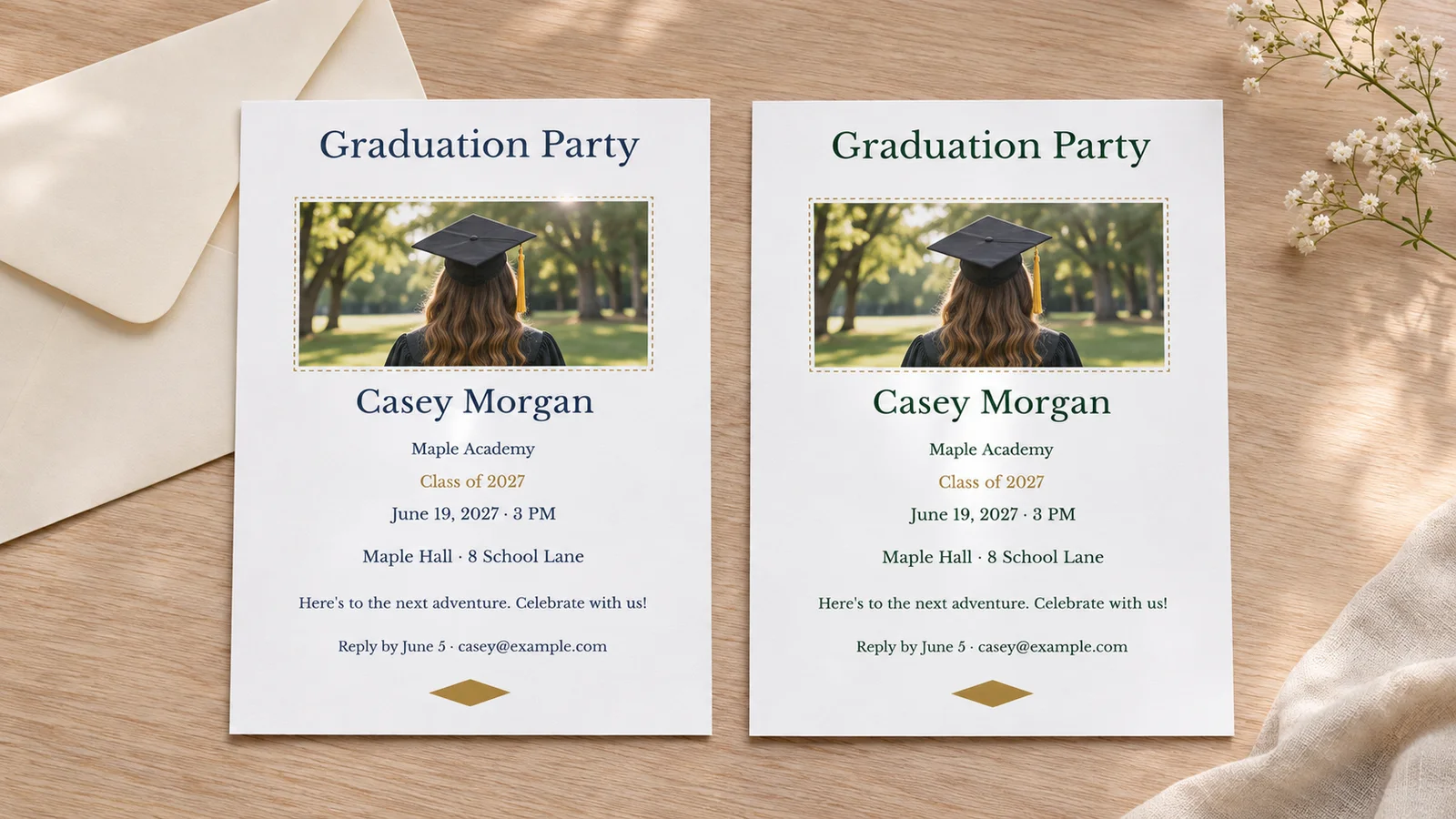
Start with the photo design and upload a clear JPEG, PNG or WebP portrait. Crop it locally, replace the graduate’s name and add the school and class year. Choose text and accent colors with the picker or enter known #hex values. The tool does not look up your school or add its logo. Keep text dark enough to read on the card’s light background.
Separate a party invite from an announcement
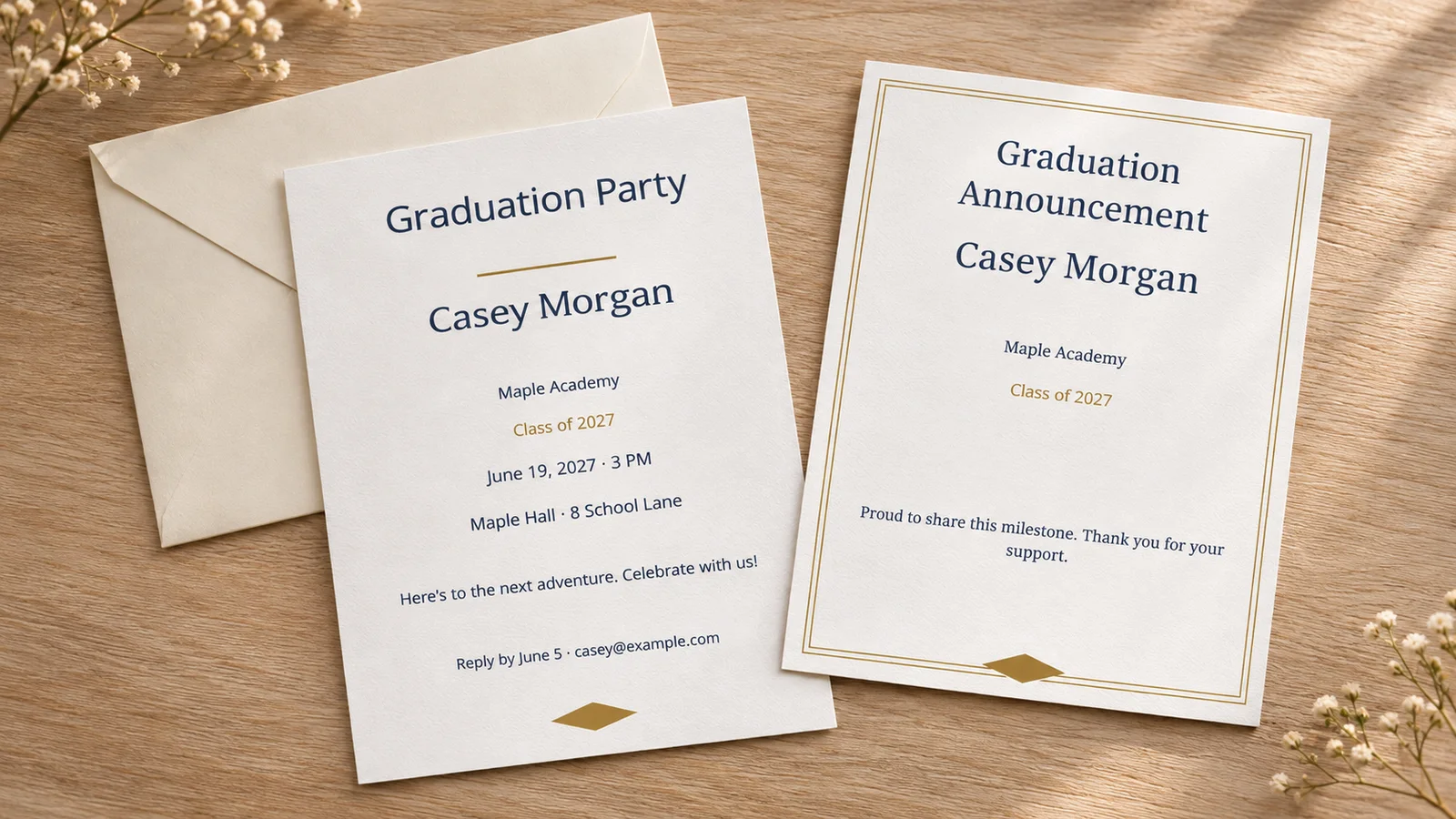
Choose a party, announcement or ceremony draft before editing. A party card asks guests to come to a celebration; a ceremony card concerns the school event and its admission arrangements. An announcement shares the achievement without asking anyone to attend. Its draft clears the date, venue and reply fields so an old party address does not remain on your news card.
Prepare a print sheet or a phone image
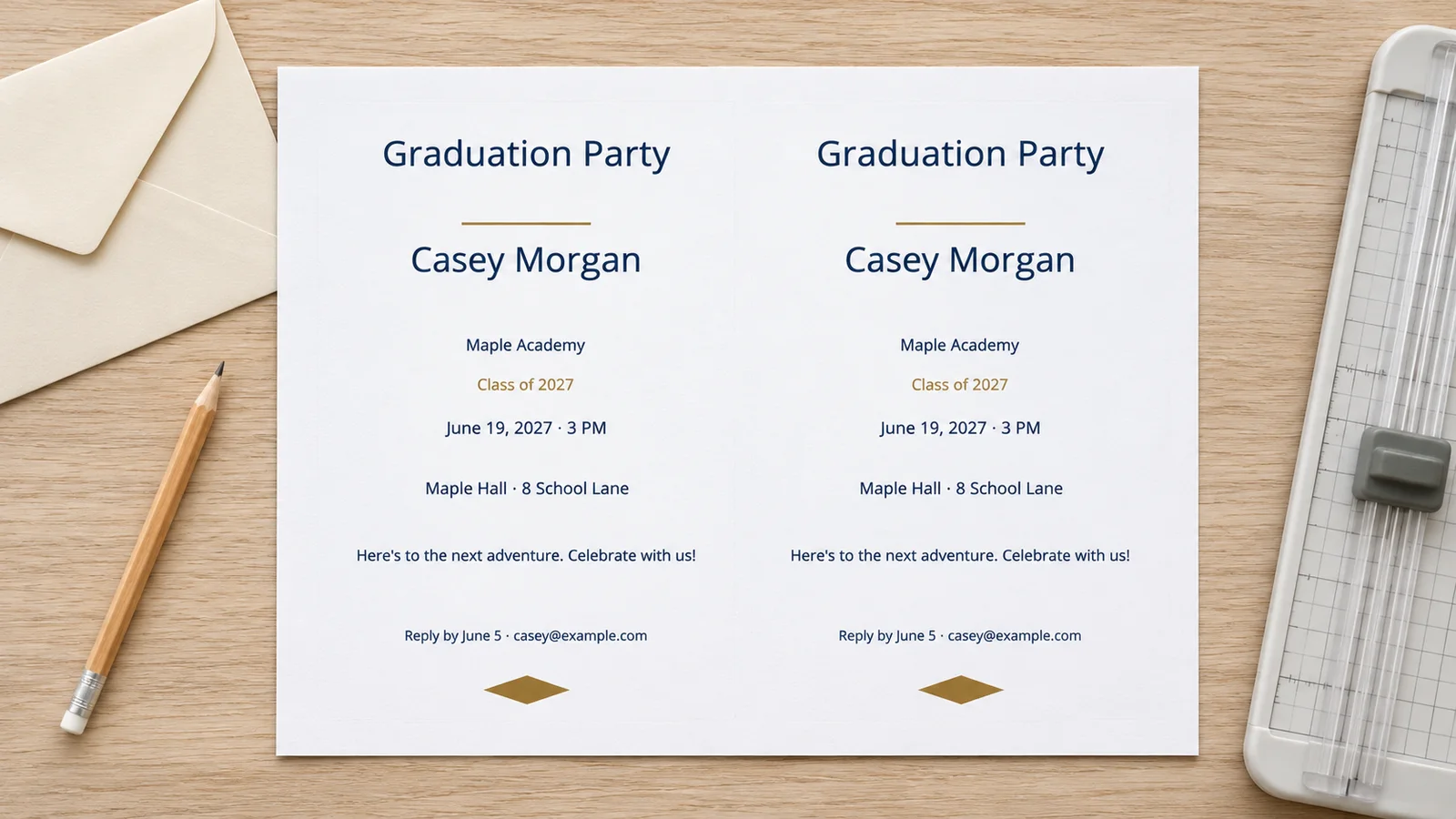
Use PDF for a measured A4 or Letter print sheet, or export a single-card PNG to send through your own messaging app. Review the name, class year, date and contact at normal reading size. Print a proof at 100% before making a batch. The downloaded image is a finished file: changing the editor later will not update cards you have already sent.
Useful options for graduation invitations
Choose the format and wording that match your actual plans.
Five finished sizes
Choose 5 × 7 inches, 4 × 6 inches, A6 (105 × 148 mm), A5 (148 × 210 mm) or compact 85 × 120 mm. Measure the inside of your envelopes before choosing. A6 and 4 × 6 inches are different sizes. Use the compact option when fitting four cards on one sheet matters more than having a large portrait.
School and graduating class
Give the school or university its own line and enter a class label such as “Class of 2027.” Replace the example year for your own graduation. Add a degree or major in the message if useful, and review long institution names in the preview. These are editable details, not a verified academic record or official school endorsement.
Custom school colors
Set the text and accent colors independently with a picker or a #hex value. Ask your school for its published color values if exact branding matters. On-screen colors and home-printed ink can differ, so proof the finished card. The background follows the chosen palette; the editor does not supply an official logo, a brand kit or color-certified printing.
An actionable reply line
For a party or ceremony, include a reply deadline and a contact guests can use. Replace every example.com address. For an open house, state the visiting window rather than implying everyone must arrive at one start time. The reply line prints as text; it does not create a response form, send reminders or count guests.
A local photo workflow
Upload a JPEG, PNG or WebP of up to 15 MB and 24 megapixels in the photo layout. Keep the face inside the crop and review any quality warning. A clear original is preferable to a screenshot enlarged for printing. The other six styles work without a photo. Save your completed download before leaving the editor.
Optional batches
Paste a list or import UTF-8 CSV for up to 200 records, map the fields and inspect several examples. Check that a guest name does not accidentally replace the graduate’s name. Make a small proof batch first. Multiple PNG files download as a ZIP, and large image batches may need to be split into smaller groups.
How to make and print graduation invitations
Proof one complete card before printing or sharing the whole set.
Choose the purpose, design and size
Start with the photo layout or select minimal, botanical, confetti, formal, ink saver or geometric. Choose party, announcement or ceremony wording. Check your envelopes and the amount of text before selecting a card size. A ceremony invitation should follow the school’s admission arrangements; a personal printed card cannot grant entry.
- Use an announcement when you are sharing news without inviting attendance.
- Confirm the ceremony details with the school before preparing invitations.
Replace the sample details and colors
Add the graduate’s name, school and class year, then edit the message. A party card also needs a date, time, full address and reply contact. Write the month out, such as June 19, 2027, when recipients might read numeric dates differently. Choose school colors and add a portrait if desired.
- For an open house, write a clear window such as “Drop in between 3 and 6 PM.”
- For an announcement, keep the date, venue and reply fields blank unless the information serves a clear purpose.
Review the sheet or single-card export
Choose A4 or Letter to match your printer paper and inspect the sheet arrangement, trim guides and optional 3 mm bleed. Two 5 × 7 inch cards may require adjusted sheet settings; four-up uses compact cards. Download PDF for printing or a single-card PNG for sharing, then check the portrait crop and every line break.
- Emily Post suggests sending party invitations two to six weeks ahead; allow extra notice for travel or a busy graduation weekend.
- Set the reply deadline before your food or venue cutoff and track replies yourself.
Print at actual size and trim
Print one plain-paper proof at Actual Size or 100%, with browser headers and footers off. Measure the result and test it in an envelope. Use cardstock only within the printer’s weight, thickness and coating limits; 200–250 g/m² is an option only if the manual permits it. Trim along the guides after checking the details, then print the remaining copies.
- Avoid Fit to Page when you need the selected finished dimensions.
- Check the printer’s paper setting as well as the PDF viewer’s scale.
Graduation invitations: common questions
Answers about announcements, photos, school colors and home printing.
Yes. All seven designs and five card sizes are free to edit and download as PDF or PNG, with no account, email requirement or watermark. Your text, photos and lists are processed locally in the browser. Paper, ink and outside printing services are your own costs.
Include the graduate’s name, school, class year, event type, date, time, full location and a reply deadline with a real contact. State whether guests are invited to a party or to the ceremony. If it is an open house, give an arrival window. Replace every sample name and example.com address before sharing.
Emily Post recommends sending party invitations two to six weeks ahead. Treat this as a planning range, not a fixed deadline: travel, school schedules and a crowded graduation weekend may require earlier notice. Choose a reply date that leaves time to confirm food and seating. The editor does not send invitations or reminders.
An announcement shares the achievement; an invitation asks someone to attend a specific event. The announcement draft includes the name, school, class year and a message while clearing the date, venue and reply fields. Review the complete card after switching drafts. Use separate wording when some recipients are invited to a party and others are receiving news only.
Yes. The photo layout accepts a local JPEG, PNG or WebP up to 15 MB and 24 megapixels. Choose text and accent colors with the picker or enter #hex values. There is no automatic school lookup or logo library. Check the crop and print a proof, because paper and ink can change how colors appear.
Yes, when the finished size fits the selected margins, guides and bleed. Two 5 × 7 inch cards may need adjusted settings. Four-up uses compact 85 × 120 mm cards, not four full-size photo cards. Inspect the preview and print at 100%. Choose cardstock only within your printer’s supported specifications.
Use PDF for a measured print sheet and single-card PNG for messaging or email. PNG exports at 300 dpi; multiple images come in a ZIP. You send the file through your own app, and guests reply to the contact you wrote. This tool does not host an event page or collect attendance online.
No. Confirm the school’s guest limit, tickets, arrival instructions and venue before sending ceremony details. A custom card is personal correspondence, not an admission credential. If ceremony seats are limited, invite the larger group to a separate celebration or send an announcement without implying they can attend.
Create graduation invitations for your milestone
Add the photo, school and class year, then choose wording that tells recipients exactly what the card is for.
Save one proof, review the details and share the finished card in the way that works for your guests.
Free PDF and PNG · No account · No watermark