Printable Guide
How to Use a Visual Schedule: A Step-by-Step Guide for Home and School
How to use a visual schedule step by step: objects, photos or pictures, how many items, the check-schedule routine, first-then boards, changes and fading.
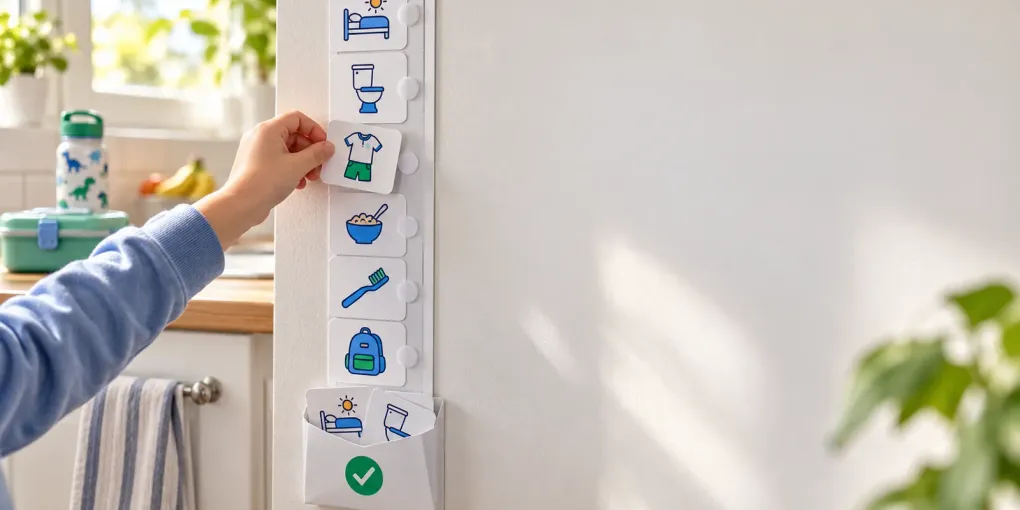
Short answer: here is how to use a visual schedule. Pick the format your child understands (real objects, photos, picture symbols or words), start with just 2 or 3 steps, and put the schedule at their eye level, from top to bottom or left to right. Before each activity, cue your child to “check schedule”. They take the next card, do the activity, then put the card in an “All done” pocket. Prompt quietly from behind, always deliver what the schedule promises, show changes on the schedule, and fade your prompts, not the schedule.
That routine comes from the people who study it. Visual supports are one of 28 evidence-based practices for autistic children and young people in the US national review by NCAEP (NCAEP 2020 report). AFIRM at the University of North Carolina reports that they work from early intervention (ages 0–2) to young adults (19–22) (AFIRM). This guide puts the advice from AFIRM, US autism centers, NHS therapy teams and the Child Mind Institute into one plan you can follow at home or in class. Updated 2026-10-18.
What is a visual schedule, and does it work?
A visual schedule shows the steps of a routine or a day as pictures, in order. NCAEP defines a visual support as “a visual display that supports the learner engaging in a desired behavior or skills independent of additional prompts”. In plain words, the schedule tells the child what comes next, so an adult doesn’t have to keep saying it.
It helps most with transitions: leaving the playground, stopping a game for bath time, getting ready for school. It is widely used with autistic children, but it also helps children with ADHD and many toddlers. The Child Mind Institute notes that “visual prompts like posted schedules can help kids, especially those with ADHD or autism” (Child Mind Institute).
AFIRM breaks every schedule into five choices. Make them on purpose and most problems go away:
| Choice | Options | How to decide |
|---|---|---|
| What it shows | Objects, photos, picture symbols, words | The most abstract format your child understands reliably |
| How long it is | 1 item, 2 (first-then), 3–4, half a day, full day | Start shorter than you think |
| Direction | Top to bottom or left to right | Top to bottom on a wall is easiest to scan |
| What happens to a finished step | Carry the card to the activity, flip it, put it in a “finished” pocket, tick it | Let the child do it themselves |
| Where it lives | Brought to the child, fixed on a wall, portable folder | Fixed for home routines, portable for outings |
How to use a visual schedule: choose objects, photos, pictures or words
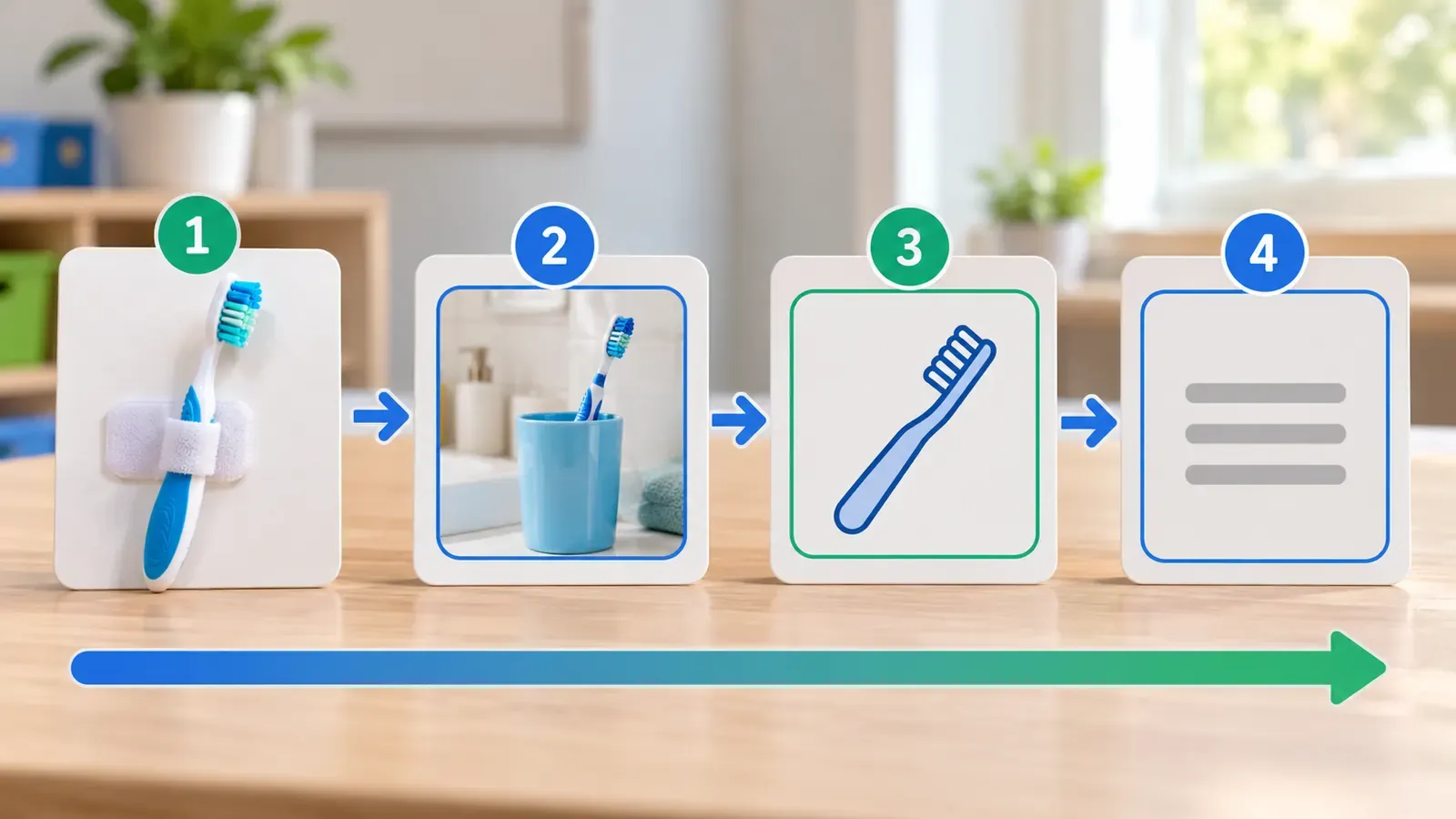
Illinois Early Learning lists the formats “from most to least concrete”: objects, photos, line drawings, written words (Illinois Early Learning). Pick the level your child understands on a bad day, not on their best day.
| Level | Example for “bath time” | Good for |
|---|---|---|
| Object | A washcloth handed over before bath | Very young children, children who don’t yet match pictures |
| Photo | A photo of your own bathtub | Children who recognize real things but not drawings |
| Picture symbol | A line drawing of a bath | Most children from about 3, classrooms |
| Written word | ”Bath” on a list | Readers, older children, teens |
A quick test: the Indiana Resource Center for Autism says a child is ready for pictures “if they can consistently match pictures or photographs (such as in a simple lotto game)” (IRCA parent guide). If they can’t match yet, start with objects. AFIRM’s toddler guide gives home examples: “a spoon for dinner, a washcloth for bath”.
You can mix levels: a photo of the real school bus next to picture symbols for the rest of the morning is fine. In the visual schedule maker you can pick from 200 picture icons, type a word card, or add your own photo. Photos stay on your device.
How many pictures should a visual schedule have?
There is no official number. The sources agree on the direction: start small. NHS Borders occupational therapists suggest starting with “2 or 3 routines” (NHS Borders), and Suffolk County Council’s learning disability team suggests “just 1 or 2 symbols” at first and “no more than 8” (Suffolk County Council). For early years settings, BCP Council advises using “only six images at a time” (BCP Council).
| Stage | Pictures on show | Example |
|---|---|---|
| First week | 2 (first-then) | First shoes, then park |
| Getting used to it | 3–4 | Toilet, teeth, clothes, breakfast |
| Confident | 5–6 | A whole morning or after-school routine |
| Older child or reader | Half day or full day, up to about 8 | A school day as a list |
The IRCA advice is worth remembering: make it “easier than you think your son or daughter can handle”, so it still works “on a really bad day”. You can always add steps later.
How to use a visual schedule in 7 steps
- Pick one hard part of the day. Mornings before school, bedtime or leaving the house are the usual starting points. Don’t schedule the whole day in week one.
- List the steps in the order you really do them. Walk through the routine once and write down each step. Use the same words you say out loud.
- Choose one picture per step and keep it. Vanderbilt’s TRIAD team advises using the same picture for the same activity every time (Vanderbilt TRIAD).
- Print and assemble. Put the first activity at the top with the rest underneath, as the University of New Mexico guide shows (UNM). Add a pocket, envelope or box for finished cards.
- Hang it where the routine happens. BCP Council suggests a vertical schedule “at a child’s eye level”. For a morning routine, that might be by the bathroom door or the front door.
- Introduce it on a calm day. Look at it together and name each picture. NHS Borders suggests reviewing the schedule before the first activity.
- Use it every time, with every adult. AFIRM stresses using visual supports “consistently and across settings”. A schedule used only on good days teaches nothing.
The quickest way to do steps 3 and 4 is to open the visual schedule maker: pick a template such as the morning routine chart, delete the steps you don’t need, and print a strip on Letter or A4.
How to use a visual schedule every day: the check-schedule loop
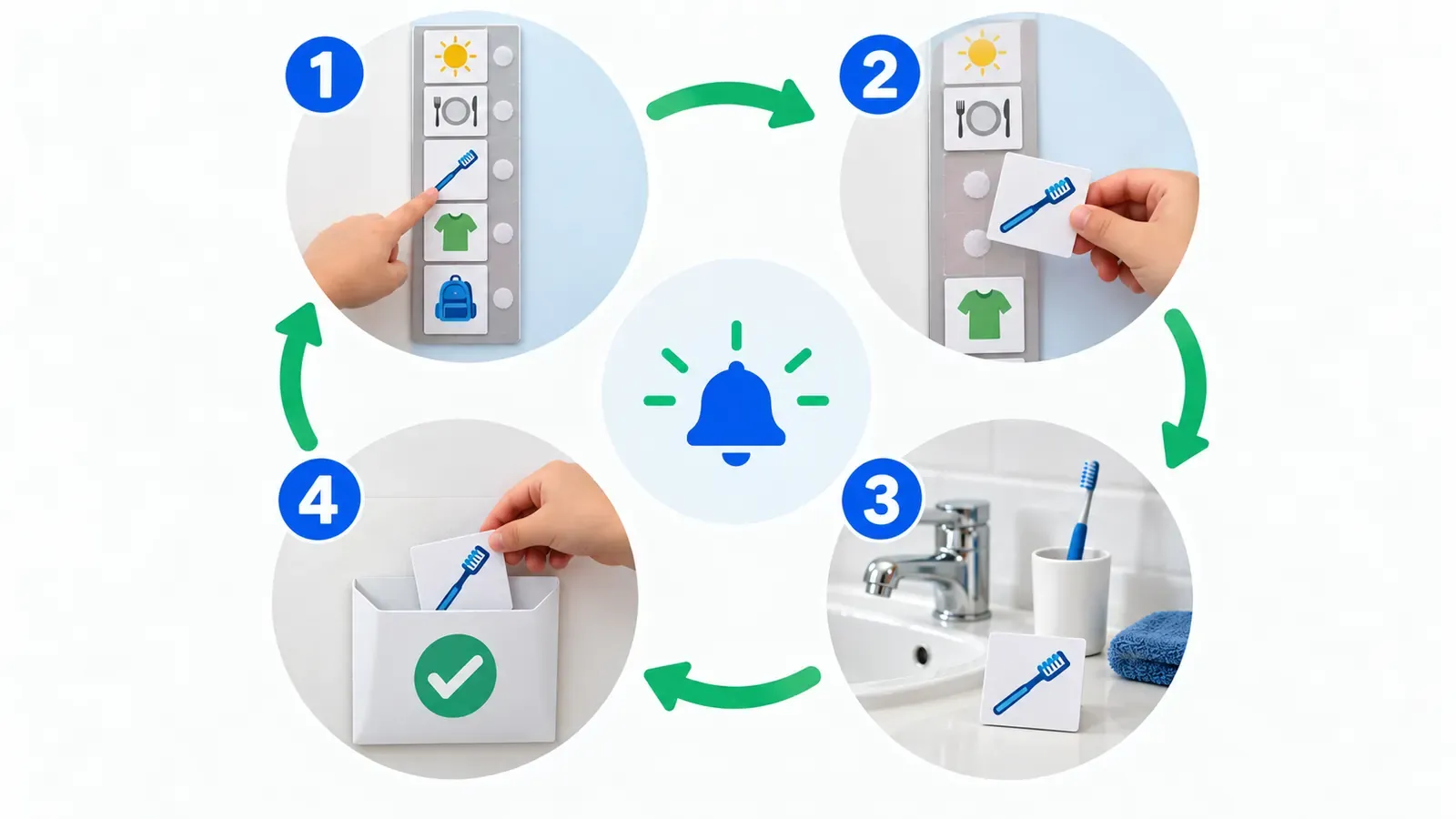
A schedule only works if checking it becomes a habit. Every transition follows the same four-step loop:
- Cue: hand your child a “check schedule” card, or say “check schedule” once. The IRCA recommends this kind of cue card.
- Take: your child goes to the schedule and takes, points to or flips the next card. Vanderbilt advises that “only the child should manipulate the schedule cards”.
- Do: the child carries the card to the activity (or leaves it on the strip) and does it.
- Finish: the card goes into the “All done” pocket, is turned over or is ticked. Healthier Together, an NHS site, lists a finished box or tray as part of every visual timetable (Healthier Together).
How to prompt. AFIRM and the IRCA both advise standing behind the child and guiding their hand, rather than leading from the front, so the child looks at the schedule and not at you. Keep words short, then “fade prompts as quickly as possible” (AFIRM). If there is no progress after “a couple of weeks”, the IRCA suggests fewer items or a more concrete format.
A tick-box strip works too. The morning routine chart can print a Monday-to-Friday tick grid next to each picture, so a dry-erase marker replaces the pocket.
How to use a first-then board
A first-then board (also called a now-next board) is the shortest visual schedule: two pictures. Put the less preferred task under First and something your child wants under Then. Say it in few words: “First shoes, then park.”
The rule that matters most: always give the “then”. Vanderbilt’s Families First program puts it plainly: “Always give the reinforcer… even if you had to prompt… Otherwise, your child may stop trusting the board” (Vanderbilt Families First). Other tips:
- Keep the “first” task short and doable at the start.
- Don’t repeat the instruction over and over. Point to the board instead.
- When the “first” is done, take the card off and put it in “All done”.
- Move to a 3- or 4-step strip once the first-then board is easy.
Print one in a minute with the first-then board template, which includes an “All done” box.
Changes, surprises and choices
Real days change, and that is where a schedule helps most. The IRCA says to “be consistent in putting down all the activities… especially if unexpected things happen”.
- Surprise or “oops” card: Healthier Together recommends having these ready. Put it on the schedule where the change happens, then show the new activity.
- Cancelled activity: Suffolk’s team suggests turning the card over or adding a cross, rather than just removing it.
- Change alert: AFIRM offers a “Change Alert” template: “Instead of… we will be…”. You can make one from two cards and a word card.
- Choice slot: offer two cards for free time and let your child pick one. Choices build buy-in.
For moving cards, print the Velcro board with empty slots and a sheet of cards to cut out. Keep a few spare cards (doctor, visitor, rain, surprise) in an envelope behind the board.
How to use a visual schedule at home and in the classroom
| At home | In the classroom | |
|---|---|---|
| Typical length | One routine: morning, after school, bedtime | Half day or full day |
| Format | Photos of your own things work well | Shared picture symbols for the whole class |
| Where | Where the routine happens (bathroom, front door) | One class timetable at the front, plus individual strips if needed |
| Who updates it | Parent, with the child moving cards | Teacher or aide, at the start of the day |
| Watch out for | Different adults using different words | Too many pictures on show at once |
A whole-class visual timetable helps more children than you might expect: in a study of 109 pupils in mainstream classes, most found visual timetables useful and wanted more say in them (Rutherford et al., 2020). An autistic pupil may still need their own strip with fewer pictures, kept on the desk. Use the same pictures at home and at school if you can. A print-out from the school day template can travel in the school bag.
Visual schedules for ADHD and toddlers
ADHD. Many children with ADHD know what to do but lose track of the order. A Leicestershire NHS tip sheet for families says “pictures, particularly for younger children, are worth a thousand words” and suggests sticking them on a chart “in the form of a checklist” to tick (Leicestershire Partnership NHS). For ADHD, a tick-box chart with 5 to 8 steps and a “ready by” time usually works better than cards.
Toddlers. Keep it to 2 or 3 pictures, make the pictures big, and use objects or photos. Texas A&M’s Project NEST suggests an “all done” picture and letting the child “point, flip, or remove” each card. If it isn’t working, try photos or “bigger” pictures (Project NEST). The bedtime routine template is a good first schedule: bath, pajamas, teeth, story, bed.
How to use a visual schedule: common mistakes and fixes
| Mistake | Why it backfires | Fix |
|---|---|---|
| A full-day schedule on day one | Too much to take in | Start with 2 or 3 steps (NHS Borders, Suffolk) |
| Not delivering the “then” | The child stops trusting the board | Always give it, even if you had to prompt (Vanderbilt) |
| The adult moves the cards | The child stays passive | Only the child moves, flips or ticks cards |
| Leading from the front | The child watches you, not the schedule | Prompt from behind, with few words (AFIRM, IRCA) |
| Changing pictures for the same step | The child has to relearn it | One picture per activity, every time |
| Pictures the child doesn’t recognize | The schedule means nothing | Check matching first; switch to photos or objects (IRCA) |
| Leaving changes off | A surprise breaks the routine | Add an “oops” card or a change alert |
| Home and school use different systems | The skill doesn’t carry over | Same pictures and words in both places (AFIRM) |
| Waiting for the perfect version | Nothing gets started | Plain paper and tape are fine (Child Mind Institute) |
On the last point, the Child Mind Institute says “schedules do not need to be fancy, laminated or have Velcro” (Child Mind Institute). Laminating or clear tape just helps cards last.
What card size should I print? No official size exists. We suggest 2 in (5 cm) cards for a wall strip, and 2.5 or 3 in (6.4 or 7.6 cm) for toddlers and photos. A 1.5 in (3.8 cm) card fits a small portable folder. Print at 100% (actual size) so the cards fit the slots.
How to fade a visual schedule (without taking it away)
The IRCA warns: “Avoid the temptation to eliminate the schedule.” Adults rely on calendars and to-do lists, and children do too. What you fade is your prompting, then the format:
- Fewer prompts: from guiding the hand to pointing, then to a glance at the schedule.
- Fewer pictures: keep only the steps that still need a reminder.
- More abstract format: objects to photos, photos to symbols, symbols to words.
- Grown-up format: a written checklist, a planner or a phone reminder for older children. The IRCA suggests moving to “day planners and electronic organizers”.
Keep a few pictures for new or stressful days: a trip, a new school, a hospital visit. That is when a schedule pays off most.
How to use a visual schedule: FAQ
What age can you start a visual schedule? AFIRM reports visual supports work from early intervention (0–2 years) up to young adults. For toddlers, start with objects or big photos and a two-step first-then board.
Should a visual schedule go top to bottom or left to right? Either works; AFIRM lists both. Top to bottom on a wall is easiest for most children, and left to right suits a desk strip or a reader.
Do I need Velcro and lamination? No. They make cards easy to move and long-lasting, but the Child Mind Institute says a schedule does not need to be laminated or have Velcro. A tick-box strip, clear tape or a pocket also work.
My child pulls all the cards off. What now? Show fewer cards (only the next two), put the rest out of reach, and practice the “take one card” step with help from behind. Make sure the next card is often something they like.
How long does it take for a visual schedule to work? It varies by child. The IRCA suggests changing something (fewer items or more concrete pictures) if you see no progress after a couple of weeks.
Is a visual schedule only for autistic children? No. It is an evidence-based practice for autistic learners, and it also helps children with ADHD, toddlers and whole classes. Many adults use the same idea in a calendar.
How do I ask an AI to help plan a visual schedule? Give the age, the routine and what your child understands, for example: “Plan a 4-step picture morning routine for a 5-year-old autistic child who matches photos but not drawings.” Then print it with your own photos.
Ready to make one? Open the free visual schedule maker and print a picture strip, a first-then board or cut-out Velcro cards with 200 icons or your own photos. No sign-up, no watermark, US Letter or A4. For school mornings, start from the morning routine chart with its Monday-to-Friday tick grid. Above all, how to use a visual schedule comes down to three things: start small, let your child move the cards, and keep every promise the schedule makes. A speech-language pathologist, occupational therapist or teacher can help you tailor it to your child.